
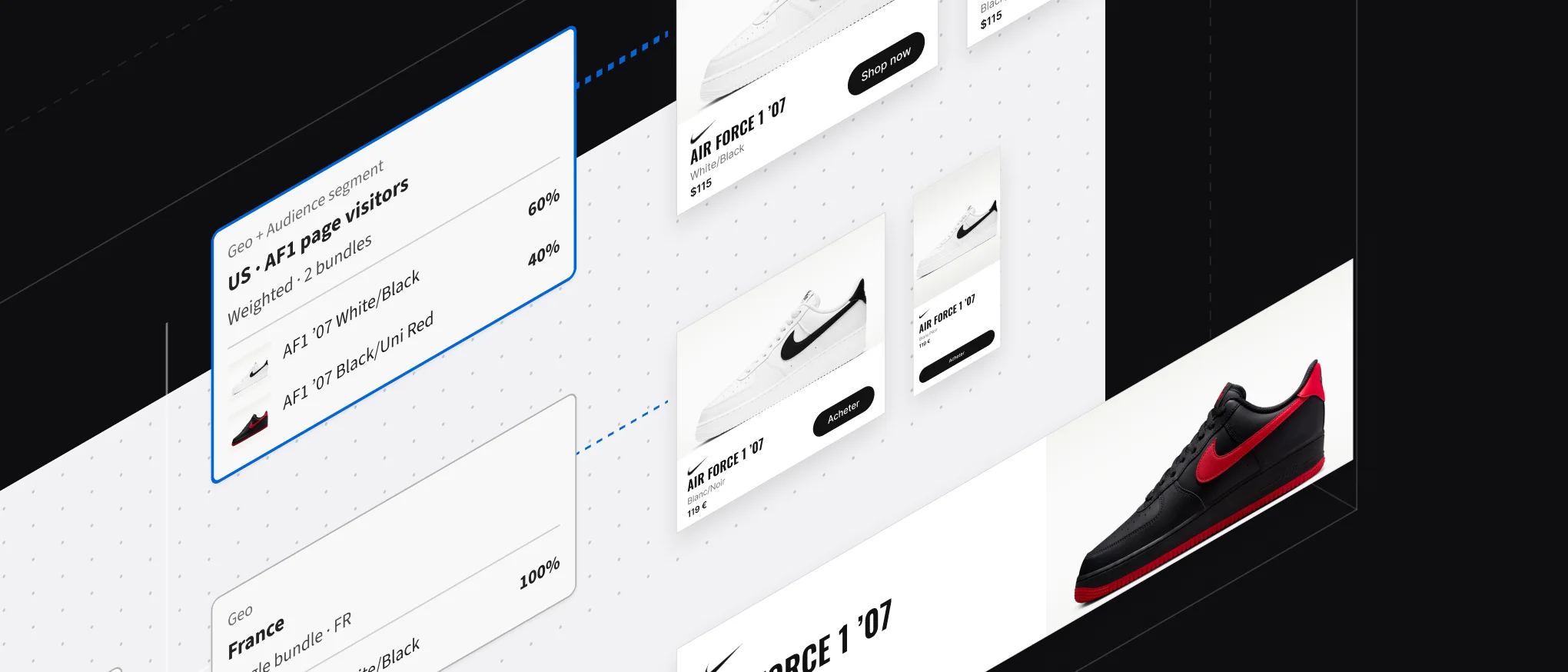
 Adobe Advertising (DSP)
Creative 2.0
Turning dynamic creative from a specialist service into a self-serve product.
The backdrop
Chrome was going to drop third-party cookies
Google’s planned deprecation of third-party cookies in Chrome meant Adobe’s tracking and dynamic ad targeting would stop working. Google set its timeline in 2023. Our deadline to have a product ready was 2024.
Google Chrome
A large share of global ad traffic runs through Chrome and Google shared services.
Tracking
Adobe’s DSP (demand-side platform) used cookies to track who saw an ad and what they did next.
Targeting
DCO (Dynamic Creative Optimization) used cookie data to choose the message each viewer sees.
The backstory
DCO came in through an acquisition
DCO serves HTML ads that change their message for each viewer. It ran on its own tool stack, outside Adobe Advertising DSP. The UI was archaic and the UX was arcane.
Separate stack
Its own tools and UI, never moved onto Adobe’s Spectrum design system.
Specialist-only
A workflow built across multiple tools that took specialist knowledge to run.
Managed service
Adobe Client Services (ACS) ran DCO for clients, so self-serve was out of the question. That limited how far DCO could expand and how many clients adopted it.
DSP business models
| Business model | Who runs the campaigns | Adobe’s role |
|---|---|---|
| Managed service | Adobe’s ACS team, on the client’s behalf | Full service: setup, trading, optimization |
| Self-serve | The client’s in-house team or agency | Troubleshooting and escalation, through ACS |
Every dynamic campaign joined the DCO queue, which capped how many dynamic campaigns the business could take on. Creative 2.0 had to work for both models: ACS teams running campaigns for many advertisers, and self-serve clients running their own.
The plumbing
The multi-hyphenated workflow of DCO creatives
A specialist built every dynamic HTML ad template by hand, starting from a spreadsheet.
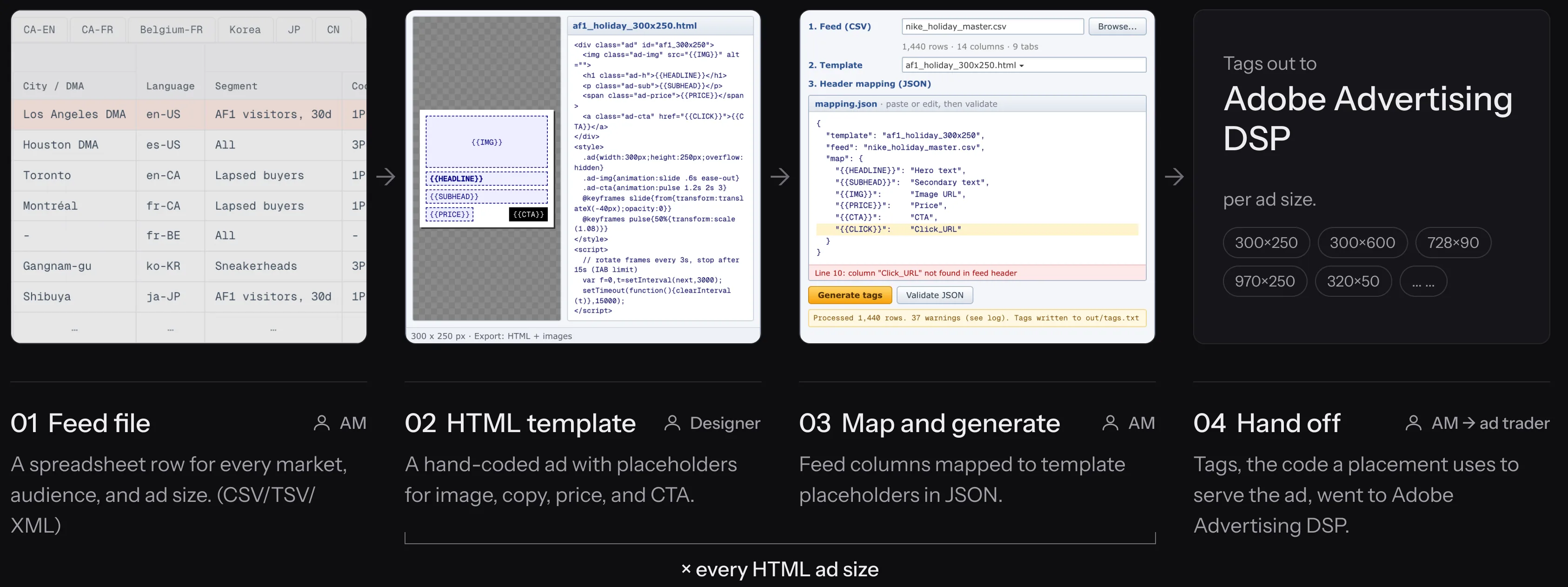
01 Feed file
A spreadsheet row for every market, audience, and ad size.
| Row | Geo | Language | Audience | Creative | |||||||||
|---|---|---|---|---|---|---|---|---|---|---|---|---|---|
| Country | Region | City / DMA | Segment | Cookie | Data pass | Size | Hero text | Secondary text | Image URL | Price | CTA | ||
| 1 | US | California | Los Angeles DMA | en-US | AF1 visitors, 30d | 1P: viewed_af1 | section=sneakers | 300x250 | Classics for the holidays | Air Force 1 '07 · White/Black | …/af1_wb_300x250_en.jpg | $115 | Shop now |
| 2 | US | Texas | Houston DMA | es-US | All | 3P: in-market sneakers | - | 300x600 | Clásicos para las fiestas | Air Force 1 '07 · Blanco/Negro | …/af1_wb_300x600_es.jpg | $115 | Comprar |
| 3 | CA | Ontario | Toronto | en-CA | Lapsed buyers | 1P: purchased_90d | - | 300x600 | Classics for the holidays | Air Force 1 '07 · White/Black | …/af1_wb_300x600_enca.jpg | CA$150 | Shop now |
| 4 | CA | Québec | Montréal | fr-CA | Lapsed buyers | 1P: purchased_90d | section=lifestyle | 728x90 | Des classiques pour les fêtes | Air Force 1 '07 · Blanc/Noir | …/af1_wb_728x90_frca.jpg | 150 $ CA | Magasiner |
| 5 | BE | Brussels | - | fr-BE | All | - | - | 970x250 | Des classiques pour les fêtes | Air Force 1 '07 · Blanc/Noir | …/af1_wb_970x250_frbe.jpg | 119,99 € | Acheter |
| 6 | KR | Seoul | Gangnam-gu | ko-KR | Sneakerheads | 3P: streetwear affinity | section=running | 300x250 | 연말을 위한 클래식 | 에어 포스 1 '07 · 화이트/블랙 | …/af1_wb_300x250_ko.jpg | ₩139,000 | 지금 구매 |
| 7 | JP | Tokyo | Shibuya | ja-JP | AF1 visitors, 30d | 1P: viewed_af1 | - | 320x50 | ホリデーに贈る定番 | エア フォース 1 '07 · ホワイト/ブラック | …/af1_wb_320x50_ja.jpg | ¥14,300 | 今すぐ購入 |
| … | … | … | … | … | … | … | … | … | … | … | … | … | … |
A single campaign for one advertiser can run to 1,440 rows, one tab per market.
02 HTML template and 03 Map and generate
A hand-coded ad with placeholders for image, copy, price, and CTA. Feed columns were then mapped to those placeholders in JSON.
<div class="ad" id="af1_300x250">
  <img class="ad-img" src="{{IMG}}" alt="">
  <h1 class="ad-h">{{HEADLINE}}</h1>
  <p class="ad-sub">{{SUBHEAD}}</p>
  <span class="ad-price">{{PRICE}}</span>
  <a class="ad-cta" href="{{CLICK}}">{{CTA}}</a>
</div>
<style>
  .ad{width:300px;height:250px;overflow:hidden}
  .ad-img{animation:slide .6s ease-out}
  .ad-cta{animation:pulse 1.2s 2s 3}
  @keyframes slide{from{transform:translateX(-40px);opacity:0}}
  @keyframes pulse{50%{transform:scale(1.08)}}
</style>
<script>
  // rotate frames every 3s, stop after 15s (IAB limit)
  var f=0,t=setInterval(next,3000);
  setTimeout(function(){clearInterval(t)},15000);
</script>{
"template": "af1_holiday_300x250",
"feed": "nike_holiday_master.csv",
"map": {
"{{HEADLINE}}": "Hero text",
"{{SUBHEAD}}": "Secondary text",
"{{IMG}}": "Image URL",
"{{PRICE}}": "Price",
"{{CTA}}": "CTA",
"{{CLICK}}": "Click_URL"
}
}The script behind it
<?php
// dco_build.php - one run per strategy, per template
$tpl  = file_get_contents('templates/af1_holiday_300x250.html'); // exported from the design tool
$csv  = fopen('feeds/nike_holiday_master.csv', 'r');
$tags = fopen('out/tags.txt', 'w');
$head = fgetcsv($csv);            // Row, Country, Region, ... Hero text, Image URL, Price, CTA

// placeholder => CSV header, hand-typed as JSON for every template
$cfg = json_decode(file_get_contents('mapping.json'), true);
$map = $cfg['map'];

while (($row = fgetcsv($csv)) !== false) {
  $r    = array_combine($head, $row);
  $html = $tpl;
  foreach ($map as $ph => $col) {
    $html = str_replace($ph, $r[$col], $html);   // a missing column renders blank, silently
  }
  $id = $r['Country'] . '_' . $r['Language'] . '_' . $r['Size'];
  file_put_contents("out/$id.html", $html);
  fwrite($tags, "<script src=\"https://dco.example.net/serve/$id.js\"></script>\n");
}
// out/tags.txt is emailed to ACS, who attach each tag to its placement by hand04 Hand off
Tags, the code a placement uses to serve the ad, went to Adobe Advertising DSP and were attached by hand.
| Stage | Task to be executed | Kinks in the workflow |
|---|---|---|
| 1. Receive | Creative arrives from the studio, per size and language | Dozens of files per message, and spreadsheets too large to check by eye |
| 2. Plan | ACS turns the media brief into a build plan | Who-sees-what lives in the plan, not the DSP |
| 3. Scaffold | The DCO team builds HTML templates in an external tool and fills the DCO sheet | Expert-only, outside the DSP |
| 4. Attach | ACS receives the scaffold and tags, and attaches them per placement | Many-to-many mapping, done manually |
| 5. QA | Preview each row by hand (1,440 rows across multiple sheets) | A wrong cell or missing size found after launch |
| 6. Learn | Reports per ad or per row, stitched together | No view by message or audience |
The kink
tl;dr - The DCO had to work without cookies
We had to figure out how to keep serving HTML-based dynamic ads, so existing clients could stay on dynamic creative optimization without their workflows being interrupted.
Targeting
DCO’s targeting had to run on signals that don’t depend on cookies.
Integration
The legacy DCO tech stack would not integrate with Adobe’s DSP.
Continuity
How do you retain existing DCO clients and not interrupt their workflow?

Research and documentation
DCO had to fit into Adobe Advertising DSP
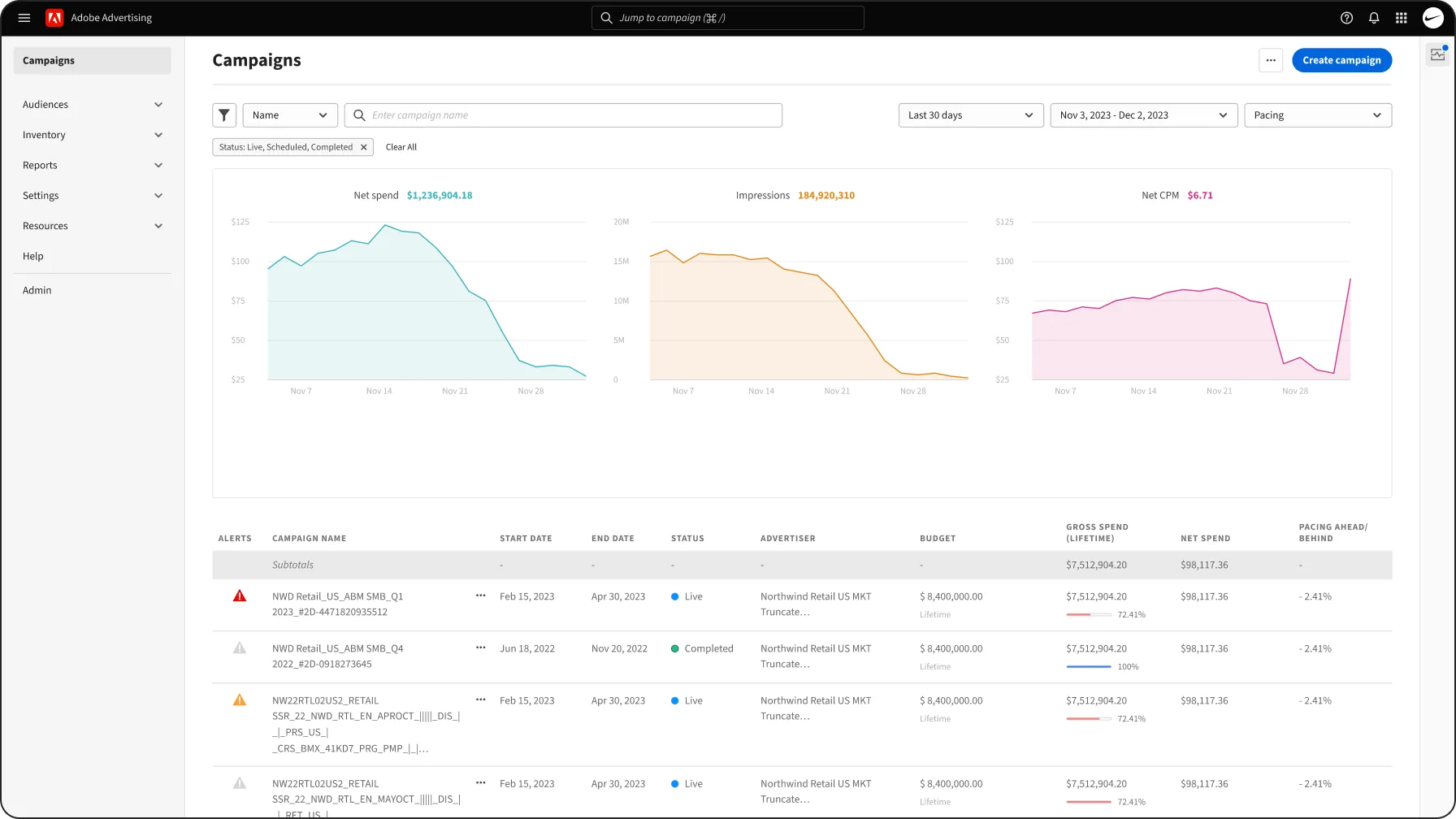
First I had to understand how DCO was set up and how its pieces would map if integrated into the DSP. I researched with Adobe’s ACS team, campaign managers, account managers, and the support team.
- Sequence of eventsHow an ad template transforms from a feed file to a targeted visual.
- System objectsThe vocabulary, concepts, and entity relationships in use today.
- DependenciesWhat depends on what, across DCO and the DSP’s surfaces.
- System modelDCO’s abstractions, mapped to mesh with the DSP’s objects.
Methods
- Observed ACS setting up dynamic (DCO) and static ads, end to end
- Shadowed planning with campaign and account managers: media brief, then tactical spend plans, then the build plan of placements and targeting line items
- Sized the mapping needed for the right permutation of creatives to reach the right audience
- Traced the spreadsheet into key:value pairs that could be uploaded (to keep legacy workflows), synced, or built in the DSP
- Benchmarked dynamic creative and ad serving tools, and ran heuristic reviews and usability studies to map mental models: what transfers, and what’s net new
Findings
- Compress the journeyPlans moved from media brief to spend plans to build plan, across different surfaces. Account managers could set up the plan directly in the product, instead of trawling through CSV sheets.
- Fit net-new conceptsBundles, experiences, and decision trees were net new, so each had to fit users’ existing understanding of how placements and ad tags come together.
- Carry the know-howThe DCO sheet had unwritten rules. The product had to carry them: validation, a fallback bundle, and preview at every step.
- Make it backward compatibleThe spreadsheet wasn’t going away overnight. Legacy DCO sheets import into Catalogs as feed files, next to uploads, synced sources, and catalogs built in the DSP.
Personas to build for
The people who build creative, set up campaigns, and support them, in ACS and in clients’ own teams.
Campaign manager (CM) Primary
Owns setup and delivery across several advertisers, in ACS or in-house. Turns a media plan into placements and needs every one to serve.
| When | I want to | So I can |
|---|---|---|
| I build a campaign from the plan | Set who sees which creative, in the DSP | Stop maintaining it in a spreadsheet |
| I launch | Know every placement will serve | Avoid a slow start I have to explain |
| Something conflicts | See it where I’m working, with the fix | Avoid finding out from delivery reports |
Designer Primary
Builds static and HTML ads in every size, language, and variant, and the ad templates dynamic ads are made from.
| When | I want to | So I can |
|---|---|---|
| I deliver a set of creatives | Upload once across sizes and languages | Avoid trafficking each file by hand |
| I build an ad template | Map its slots to a catalog | Produce variants without rebuilding each one |
| An ad breaks | See the reason and fix it myself | Avoid a back-and-forth with ad ops |
Ad trader, account manager (AM) Secondary
The ad trader optimizes live campaigns daily. The account manager supports many advertisers and fields their escalations. Both need to see what serves where, and why, without opening a spreadsheet.
Ad trader
| When | I want to | So I can |
|---|---|---|
| A placement under-delivers | See which path and bundle it serves | Fix the creative cause, not just the bid |
| A bundle outperforms | Shift its weight, or let rotation optimize | Put spend behind what works |
| A conflict appears mid-flight | Get alerted where I work | Act before budget is wasted |
Account manager
| When | I want to | So I can |
|---|---|---|
| A client asks why an ad served | Trace the viewer to a path and bundle | Answer in one conversation |
| A self-serve client escalates | See their setup and its errors | Resolve it without rebuilding it |
| I review my accounts | Spot setups at risk | Reach out before delivery drops |
The core requirement for self-serve: rich customization, and the freedom to build any targeting funnel.
The handshake
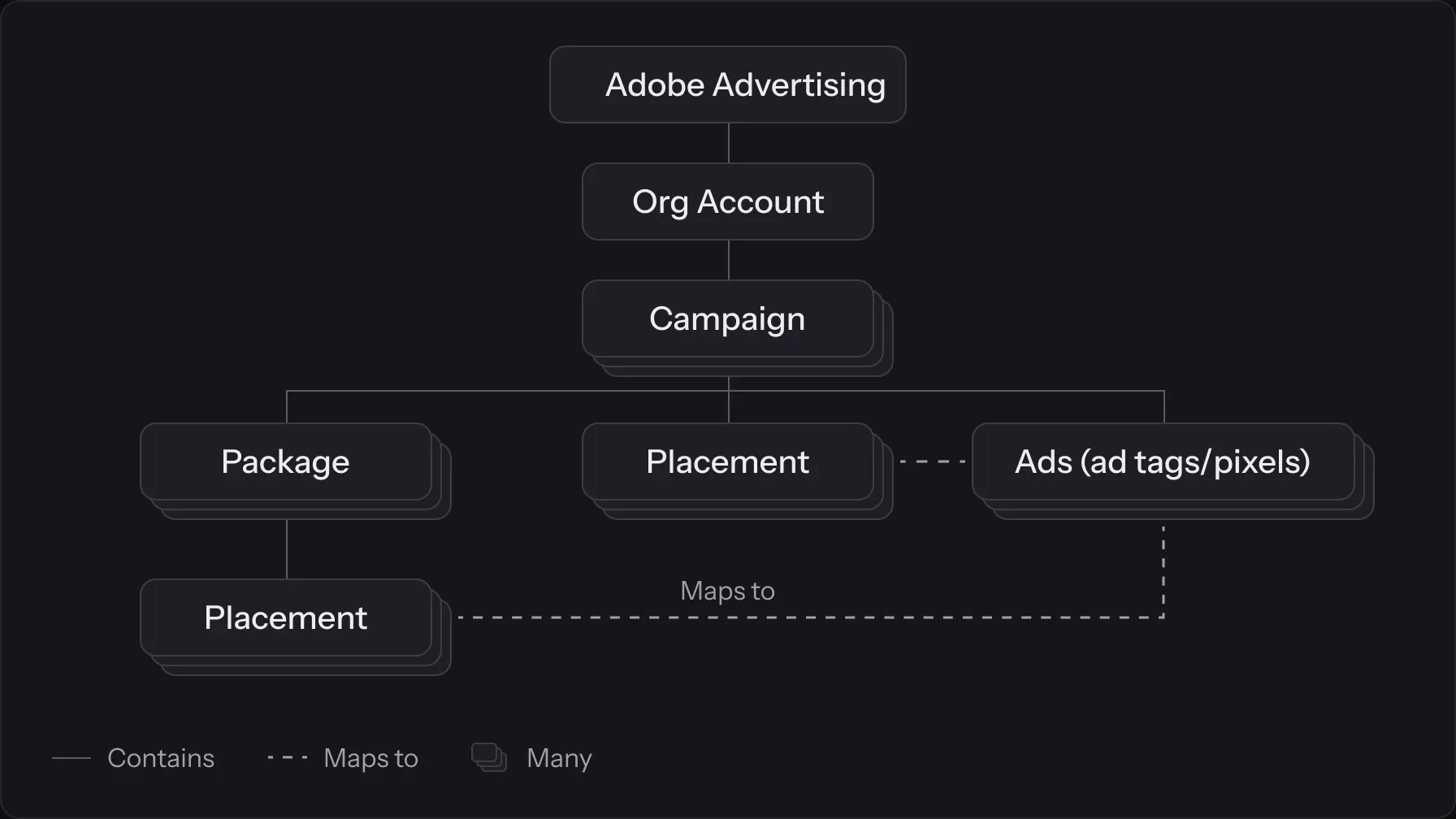
The DSP object model that the DCO would have to comply with
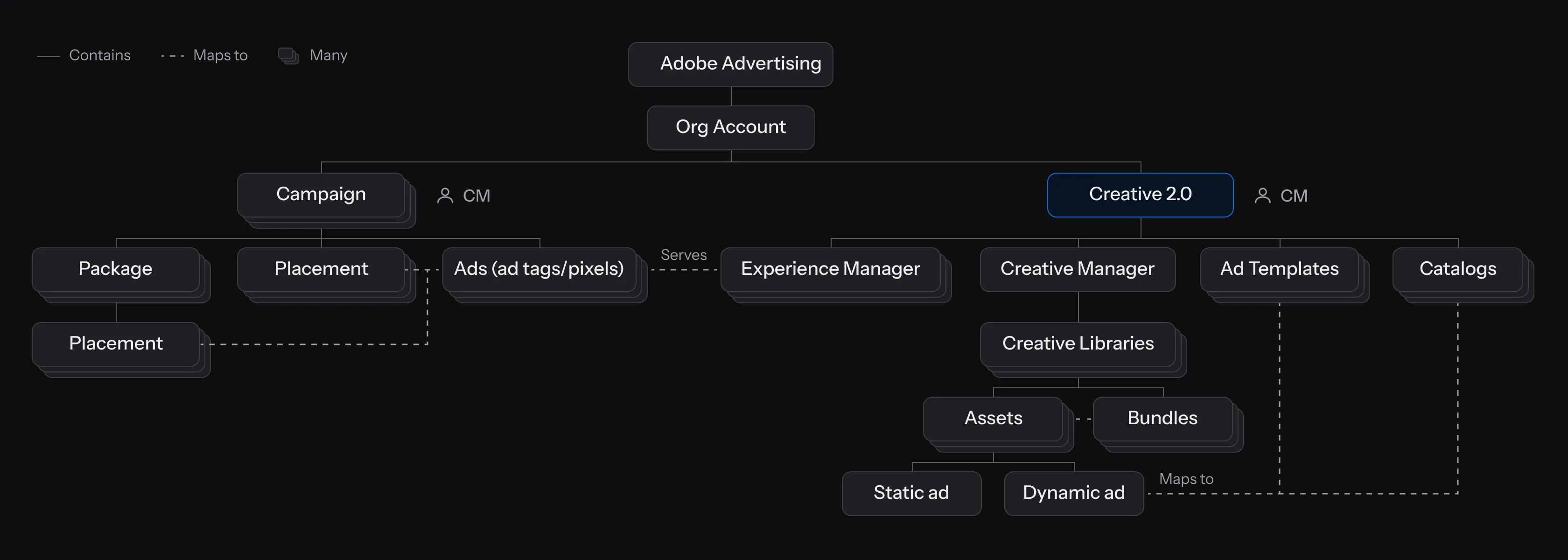
An org account holds campaigns, campaigns hold packages, packages hold placements, and ads (ad tags or pixels) attach to placements. Personalizing ads by product, language, size, and audience multiplies the number of ads in every campaign.
The thinking behind integrating DCO
- One unified serviceMaintain one unified service across Adobe Advertising.
- Self-serve dynamic creativeExpand self-serve to dynamic creatives by removing the barrier of DCO’s complex tech stack and learning curve.
- No ACS bottleneckACS bandwidth stops being the bottleneck for managed accounts once clients can self-serve.
Options considered
MVP scope
Creative 2.0 only had utility once every pillar was in place. Libraries without experiences, or experiences without tags, would still have sent teams back to DCO for the rest of the job. So the MVP shipped the whole loop - creative libraries, bundles, ad templates with catalogs, experiences with the decision tree, tags, validation, and reporting - while keeping each pillar lean. Building targeting natively let the decision tree weight signals that would survive the loss of cookies: geo, first-party audiences, profile data, and data pass key-values from publishers.
Tradeoff: a bigger first release that took longer to ship. A partial product would have forced teams to split their workflow across multiple tools.
To recap
Reconciling the new model with the DSP’s schema
The same dynamic ad, made two ways: before and after Creative 2.0.
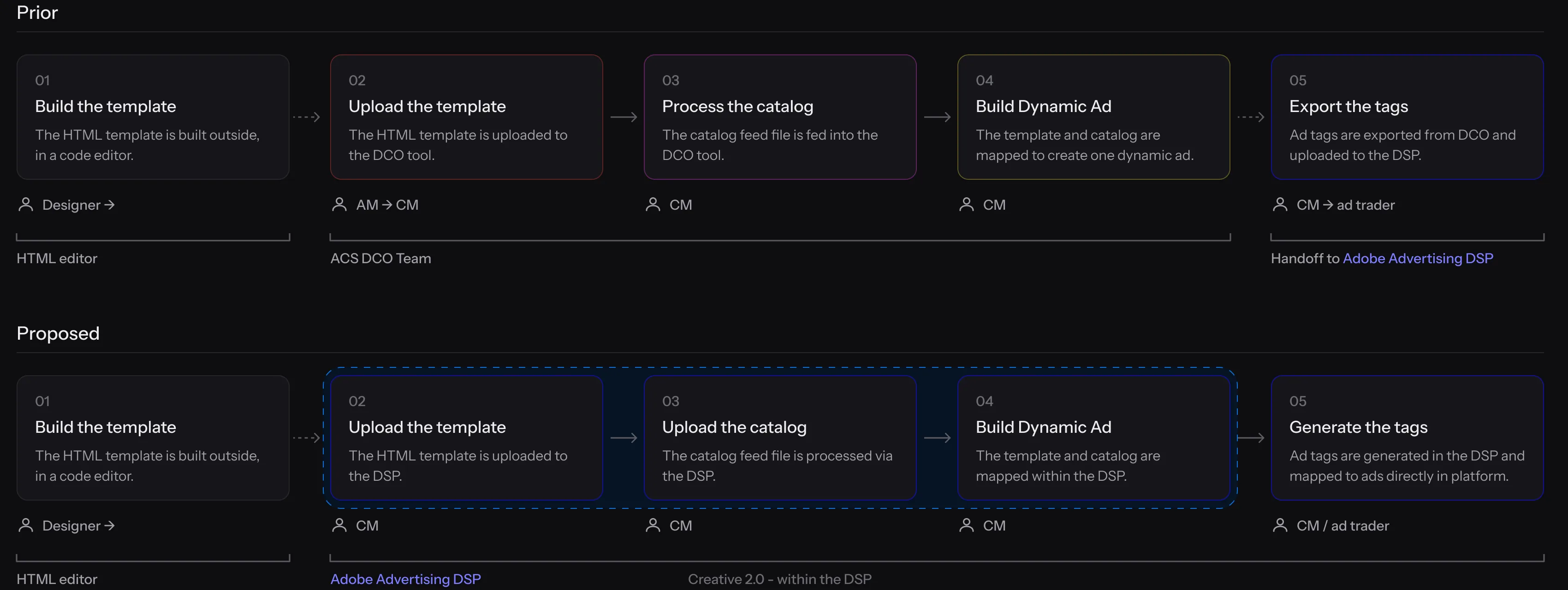
| Step | DCO workflow | Creative 2.0 |
|---|---|---|
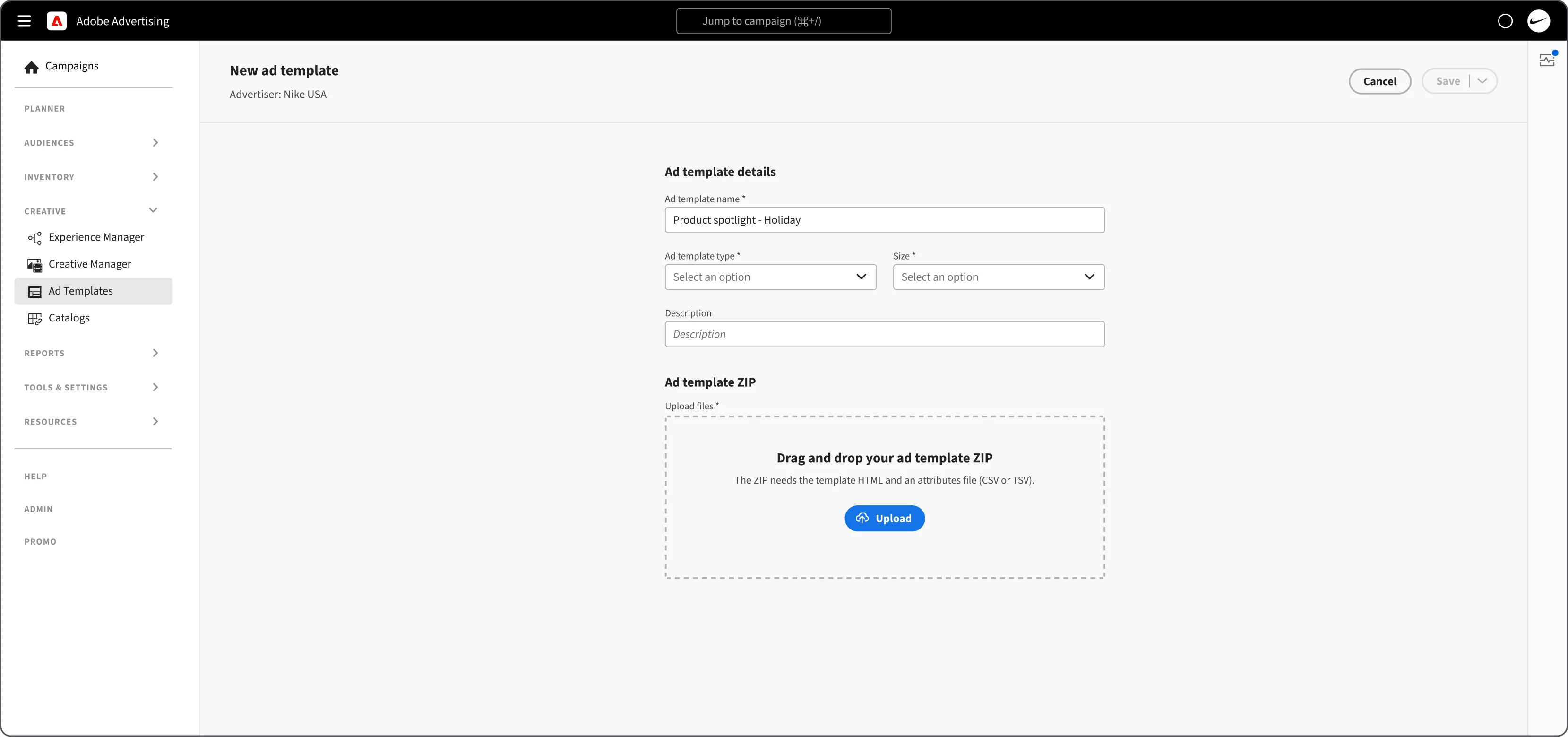
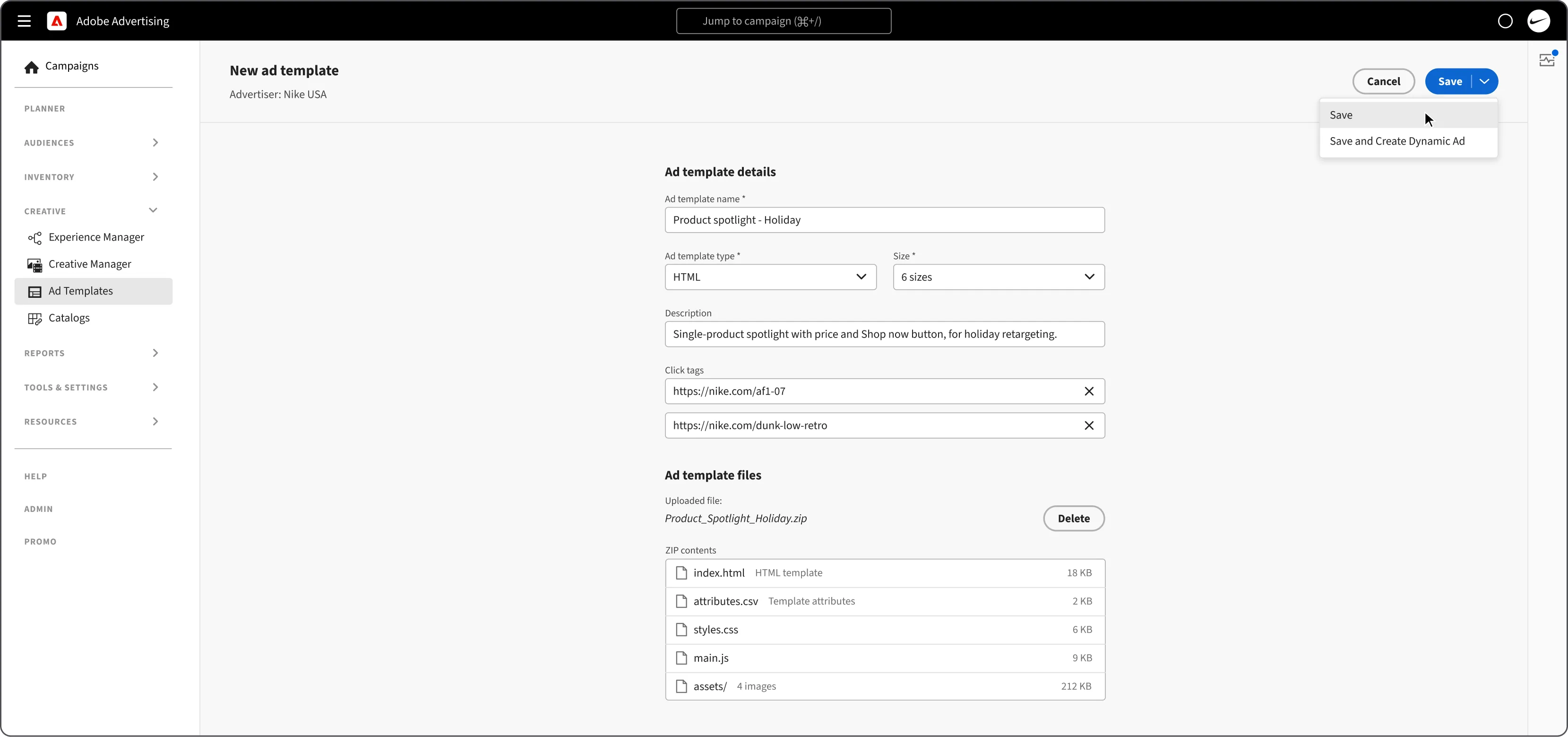
| Design the template | Drawn in a separate HTML tool; placeholders typed into each layer by hand | An ad template is uploaded as a ZIP: the HTML and an attributes file (CSV or TSV) |
| Prepare the data | One master CSV per strategy, every combination a row, kept by the DCO team | A catalog is uploaded (CSV, TSV, XML), synced from Amazon S3 or Google Sheets, or built in the DSP |
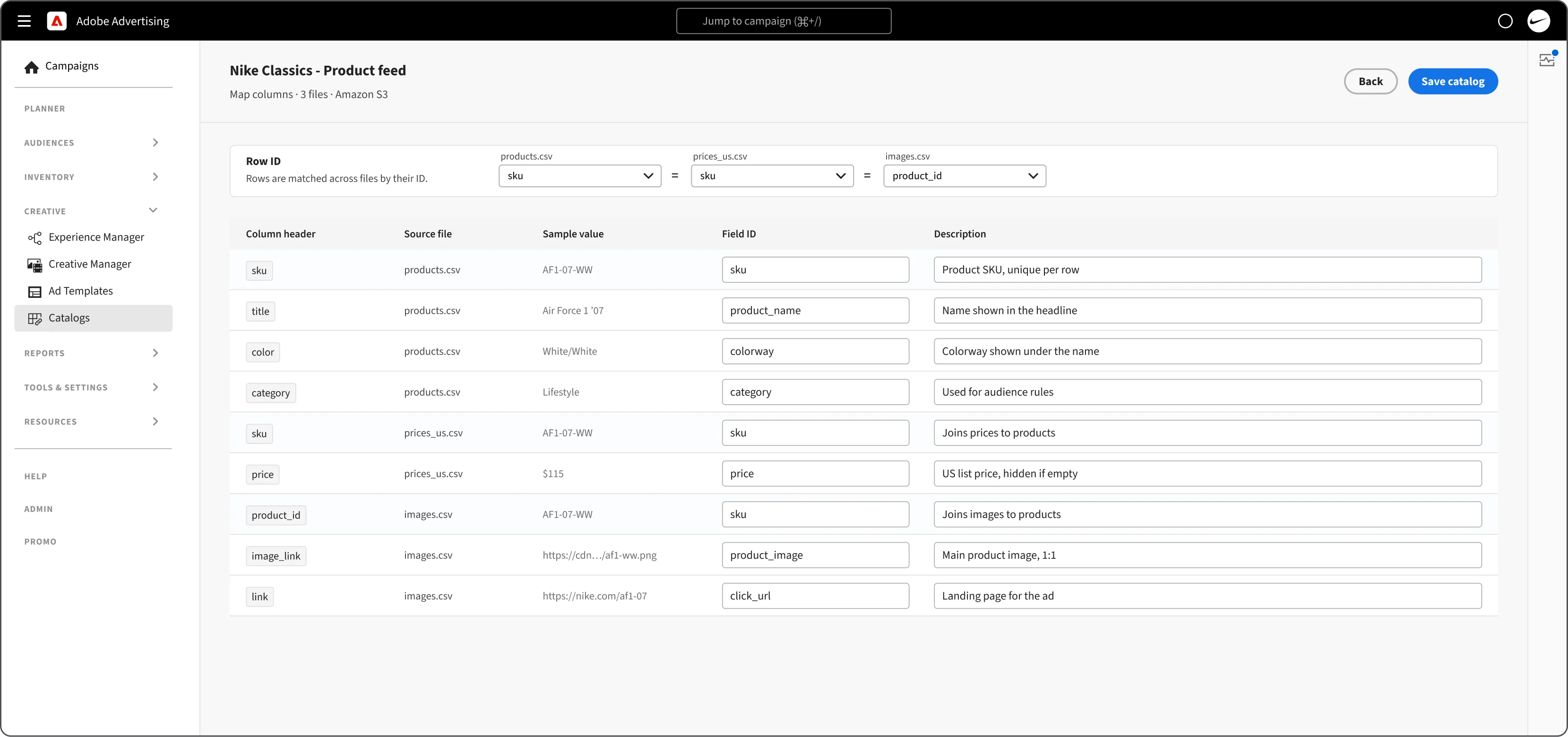
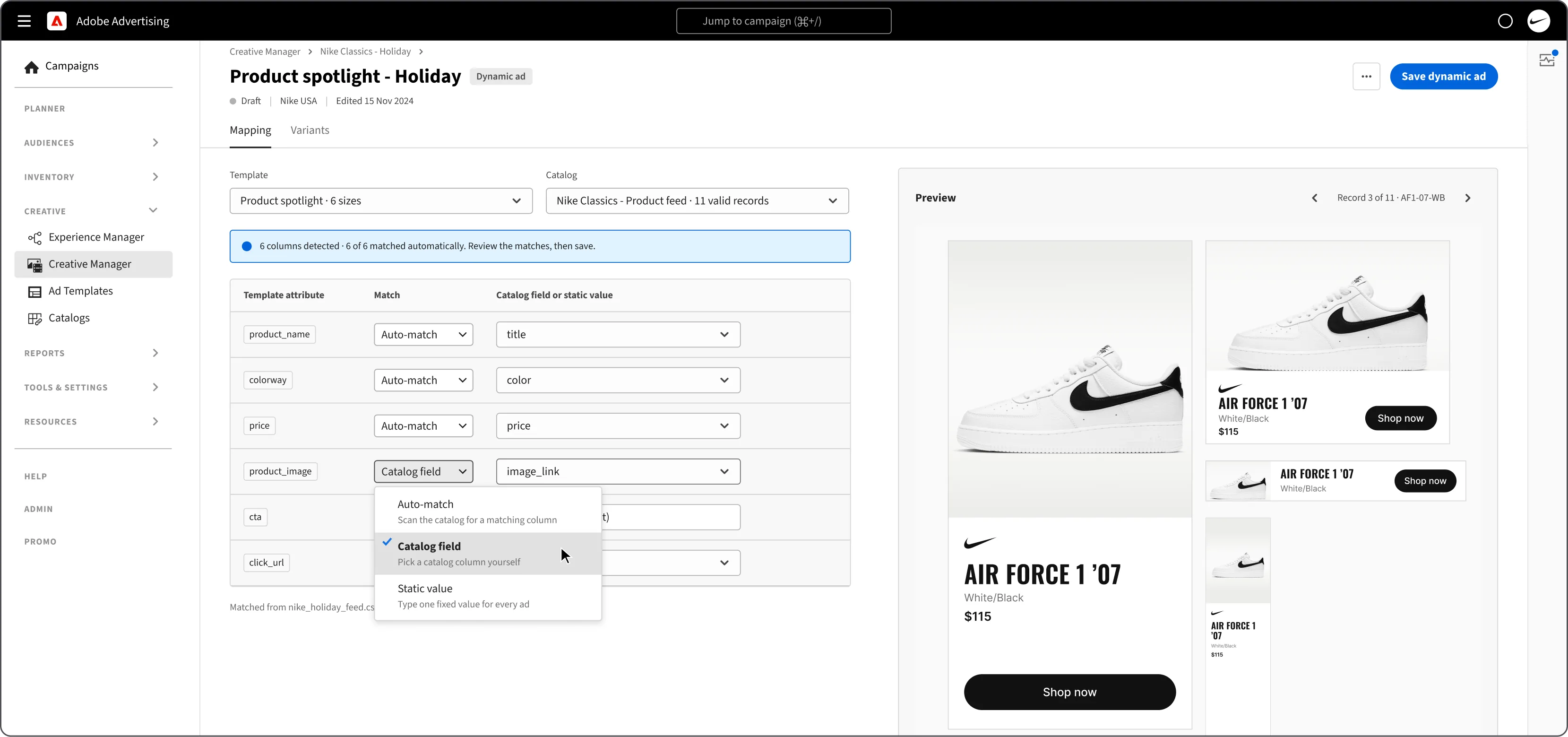
| Map data to template | Hand-typed JSON in a PHP form, mapping each placeholder to a CSV header | Columns are detected and matched to the template’s slots automatically; a person reviews the matches and saves |
| Generate | A script renders every row and writes a tag file | A dynamic ad renders every record in every size |
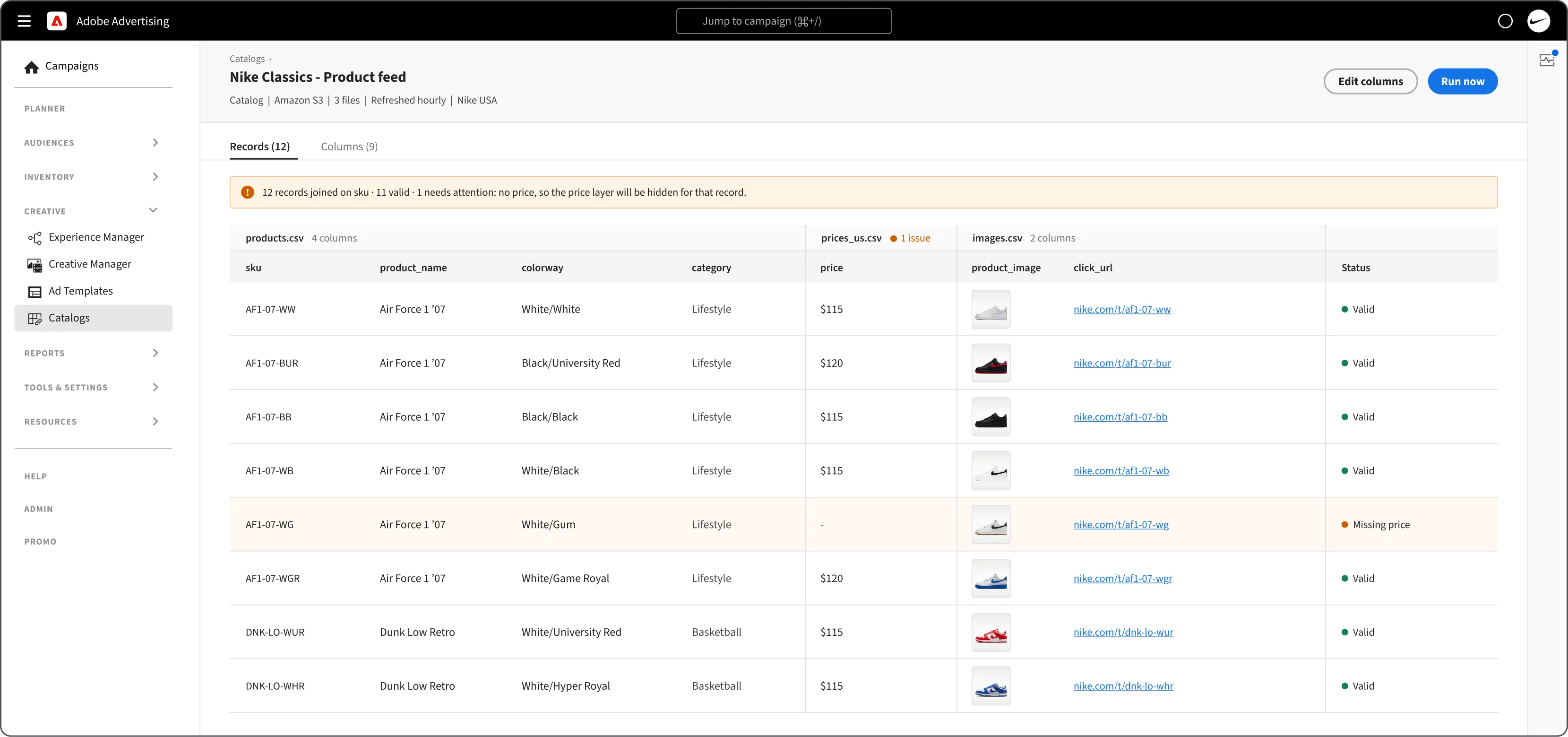
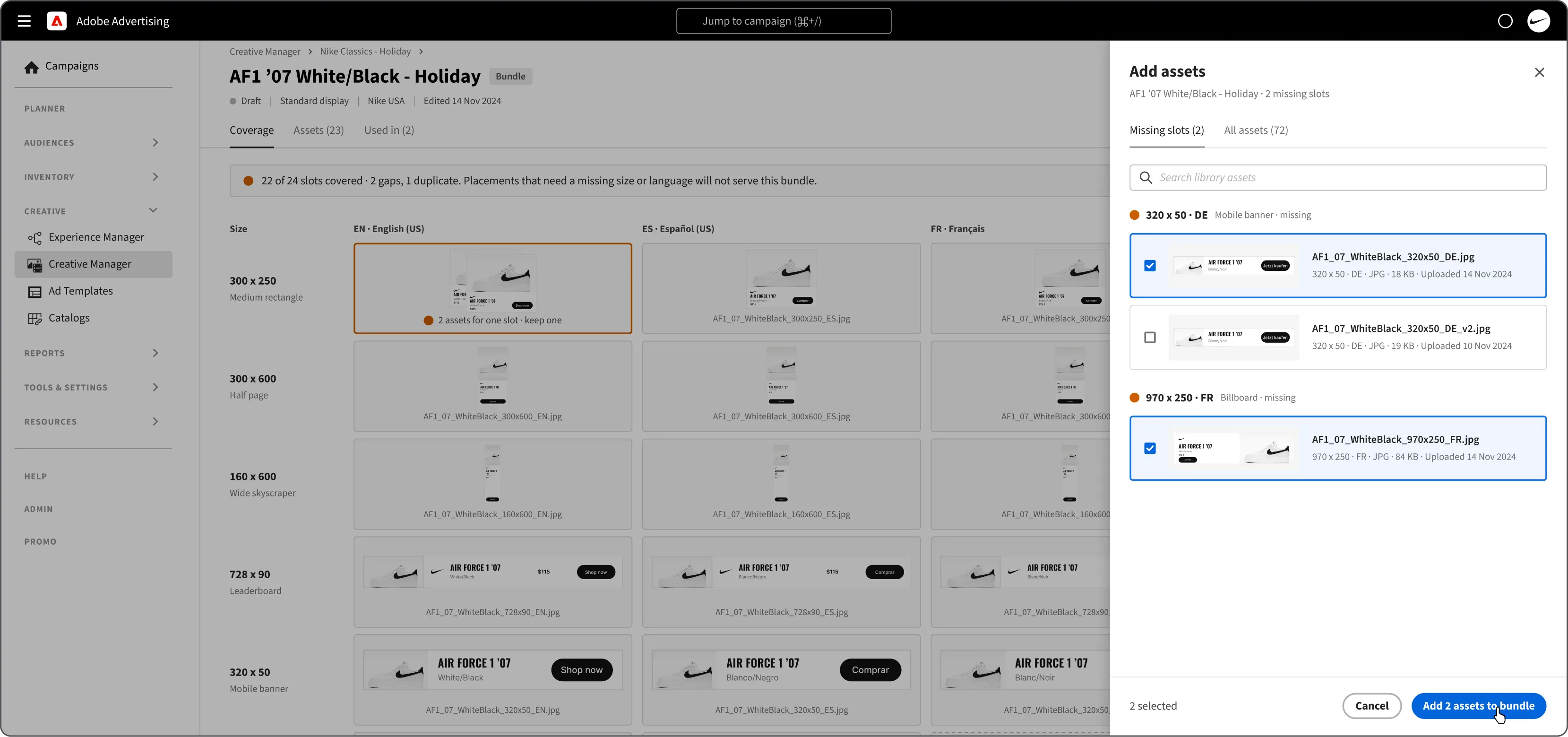
| Check | Preview row by row, 1,440 rows across sheets | Records with gaps are flagged; a missing price hides the price layer for that record |
| Hand off | Tag file emailed to ACS and attached placement by placement | Ad tags are generated in the DSP and mapped to ads directly in the platform |
The blueprint
The DCO information architecture
Files and feeds land in Creative 2.0, and an experience decides what the DSP serves.
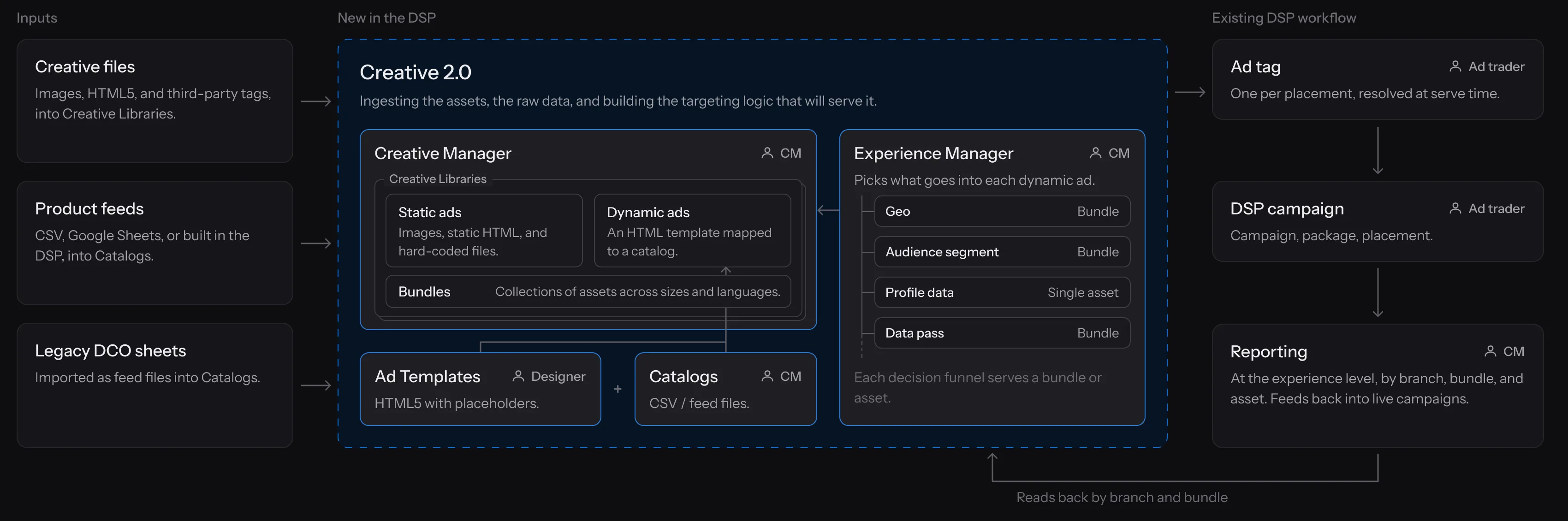
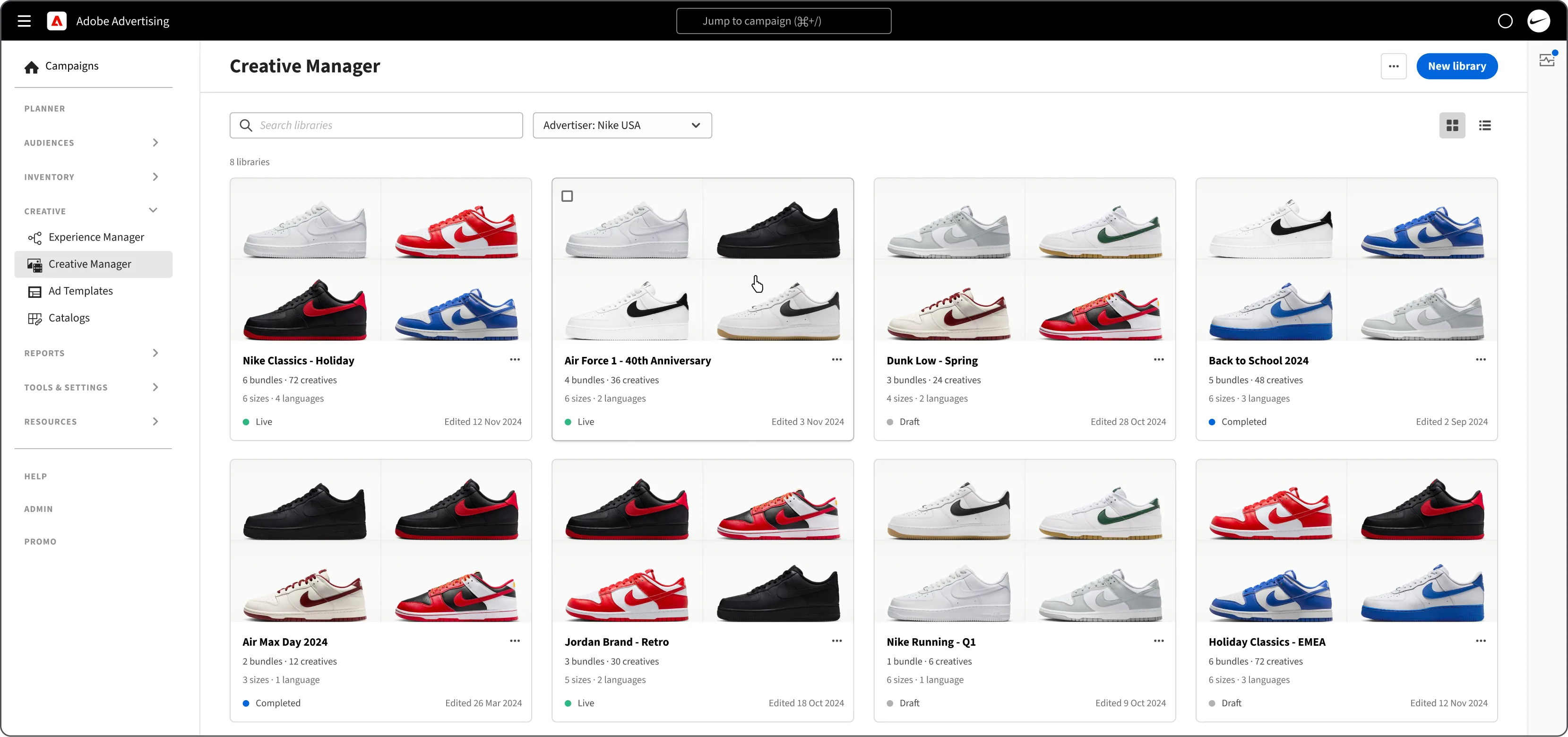
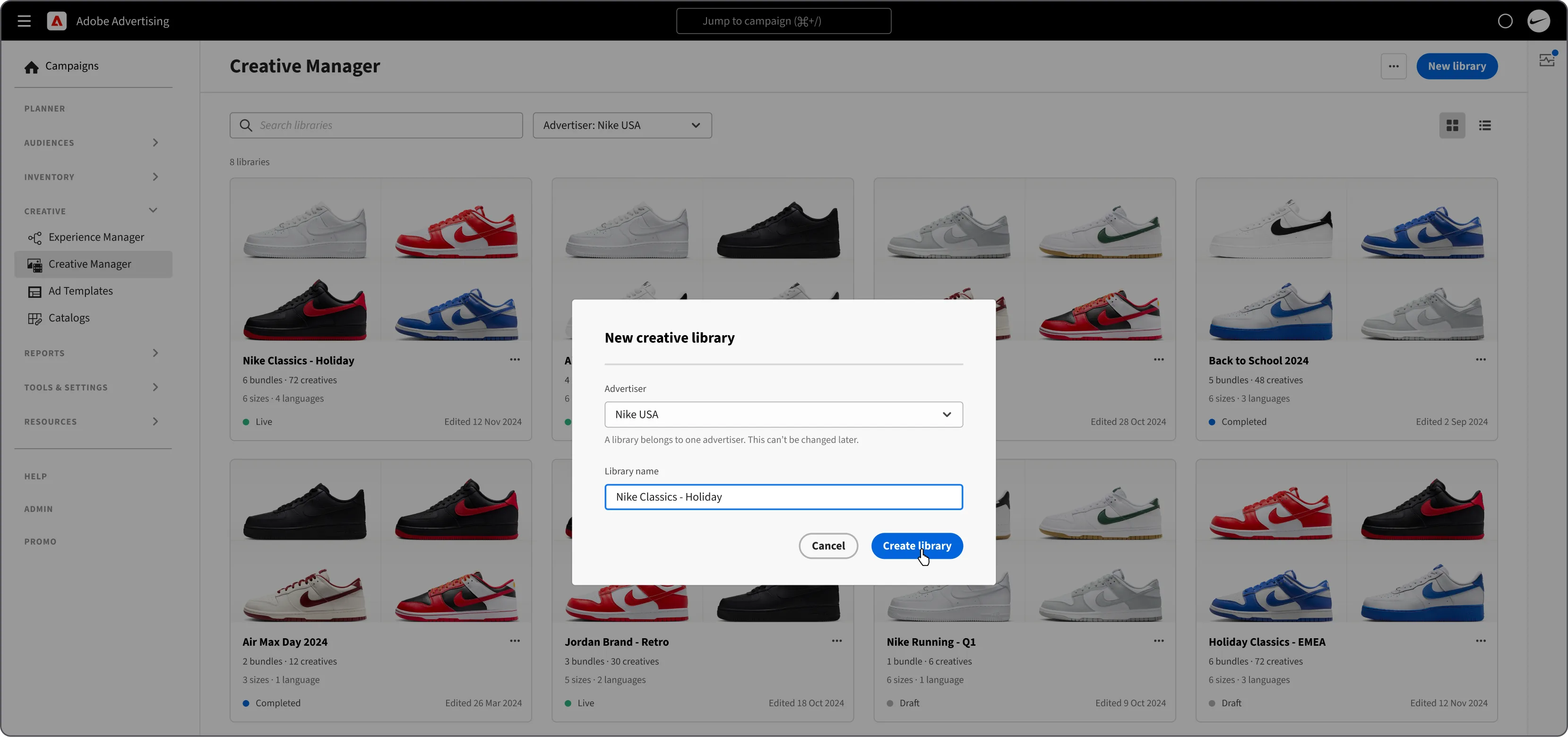
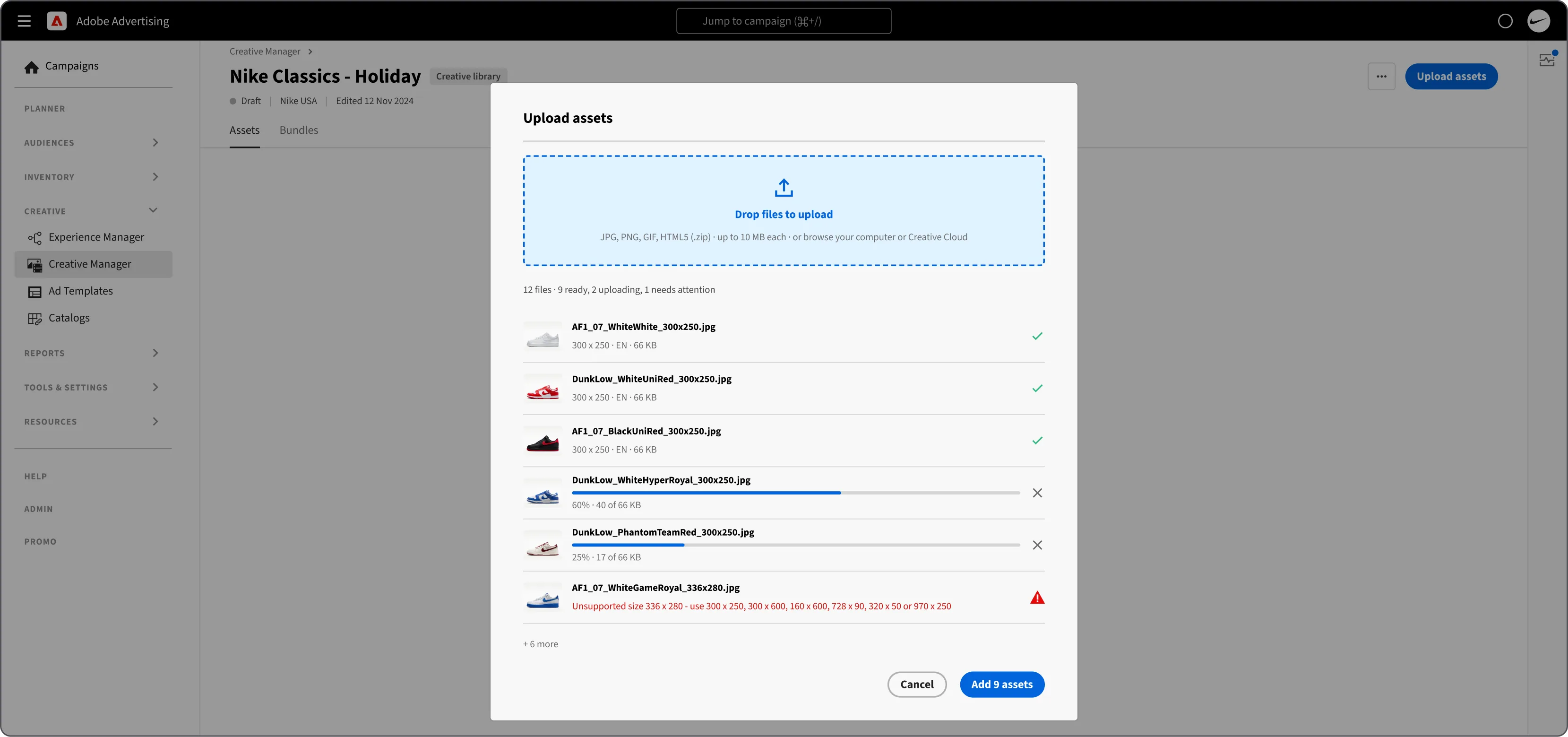
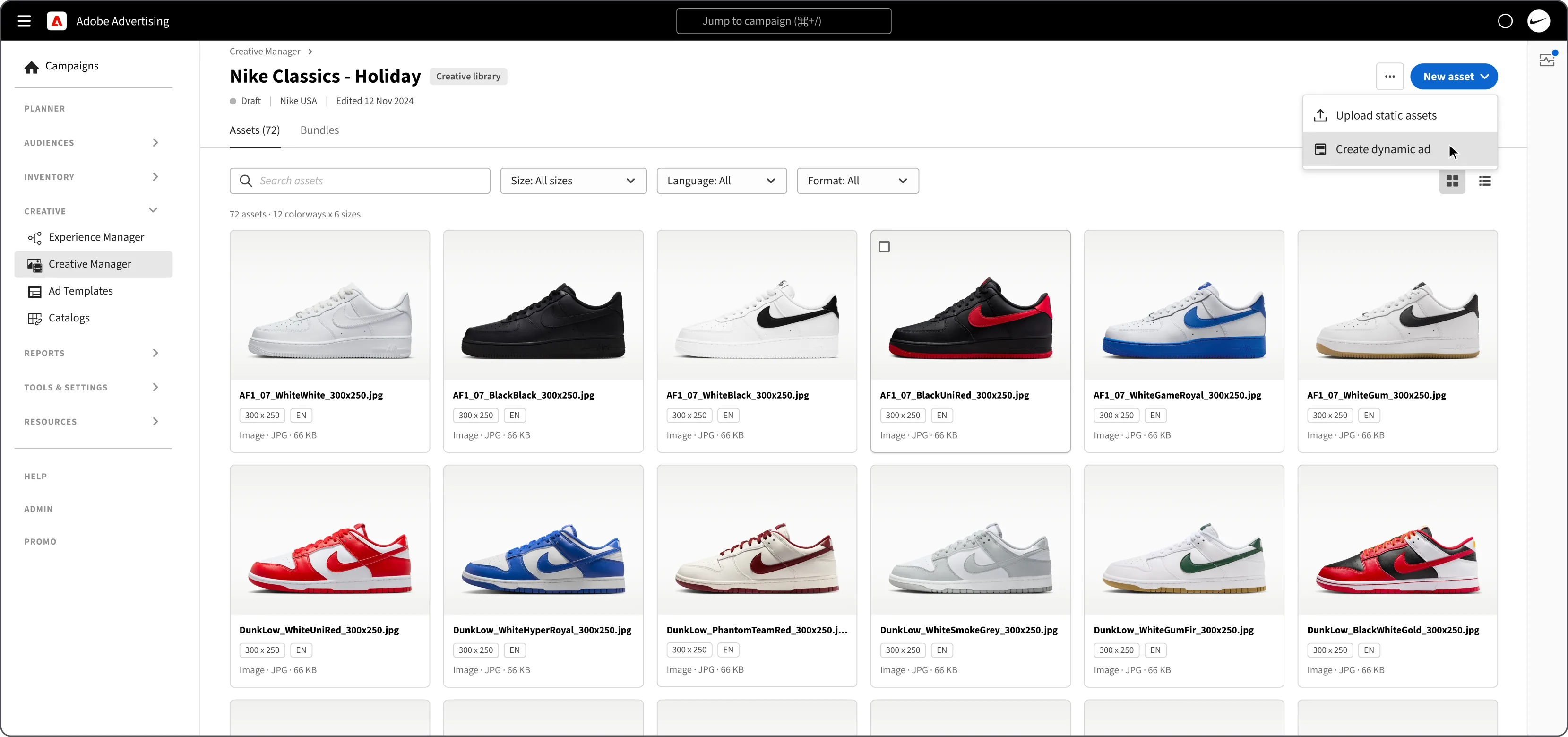
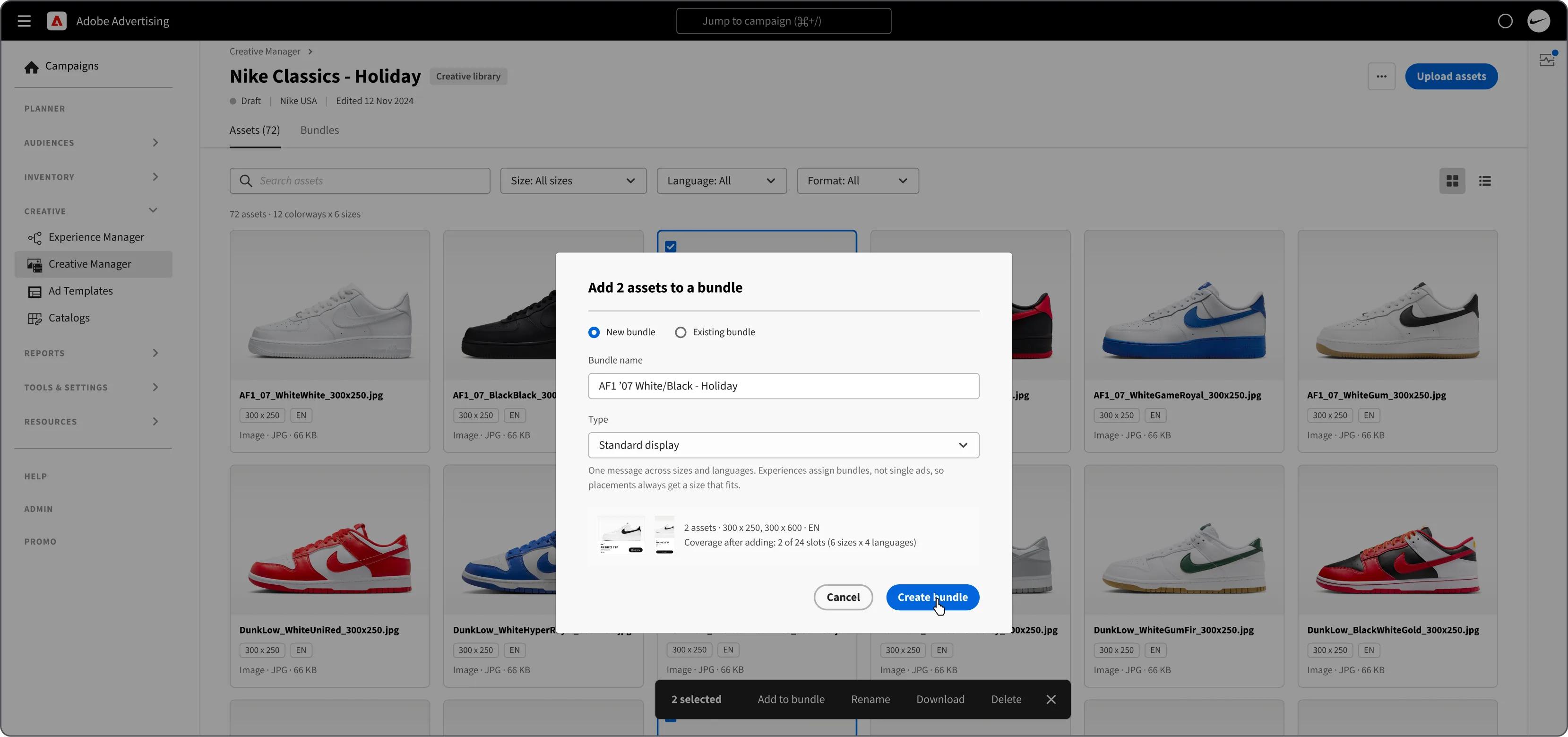
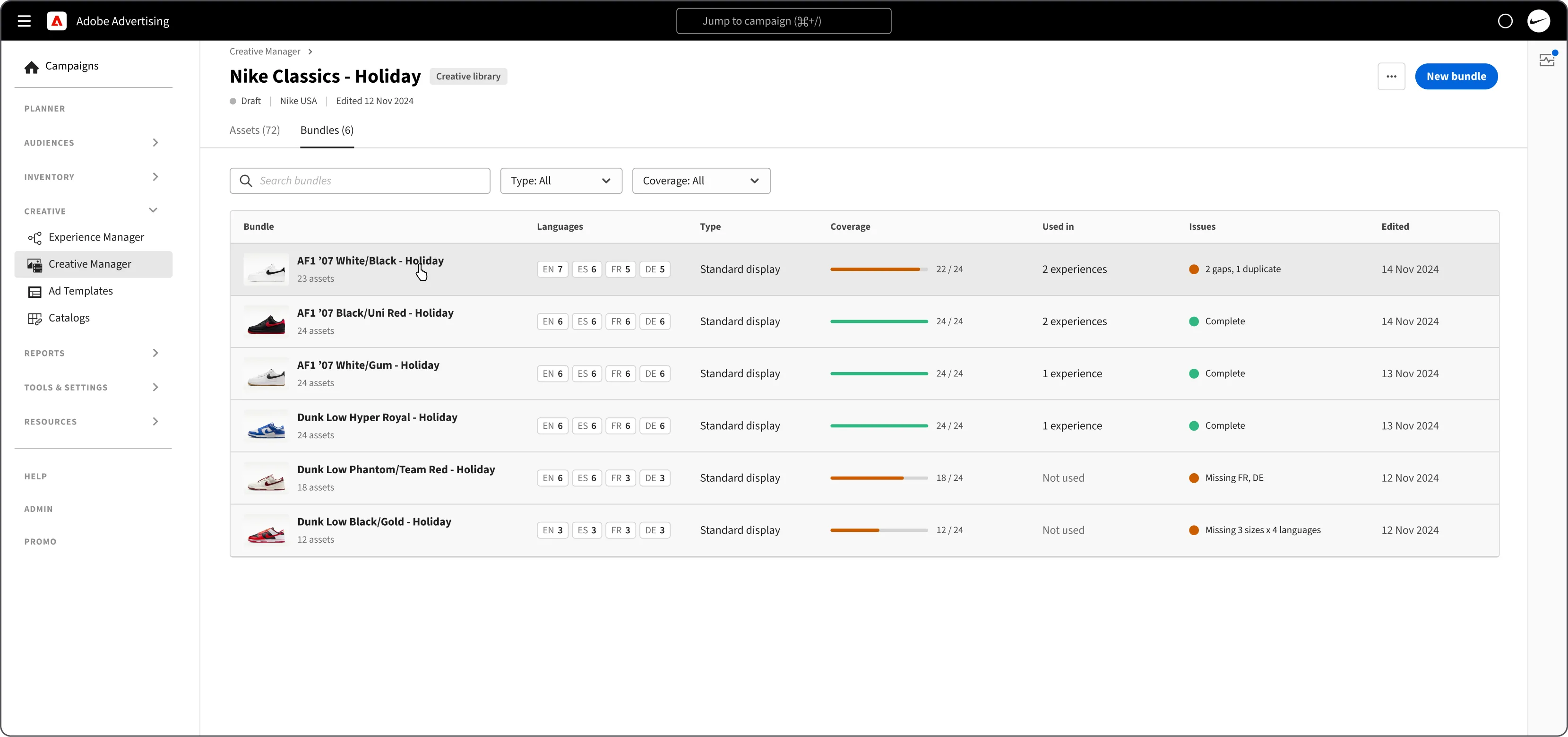
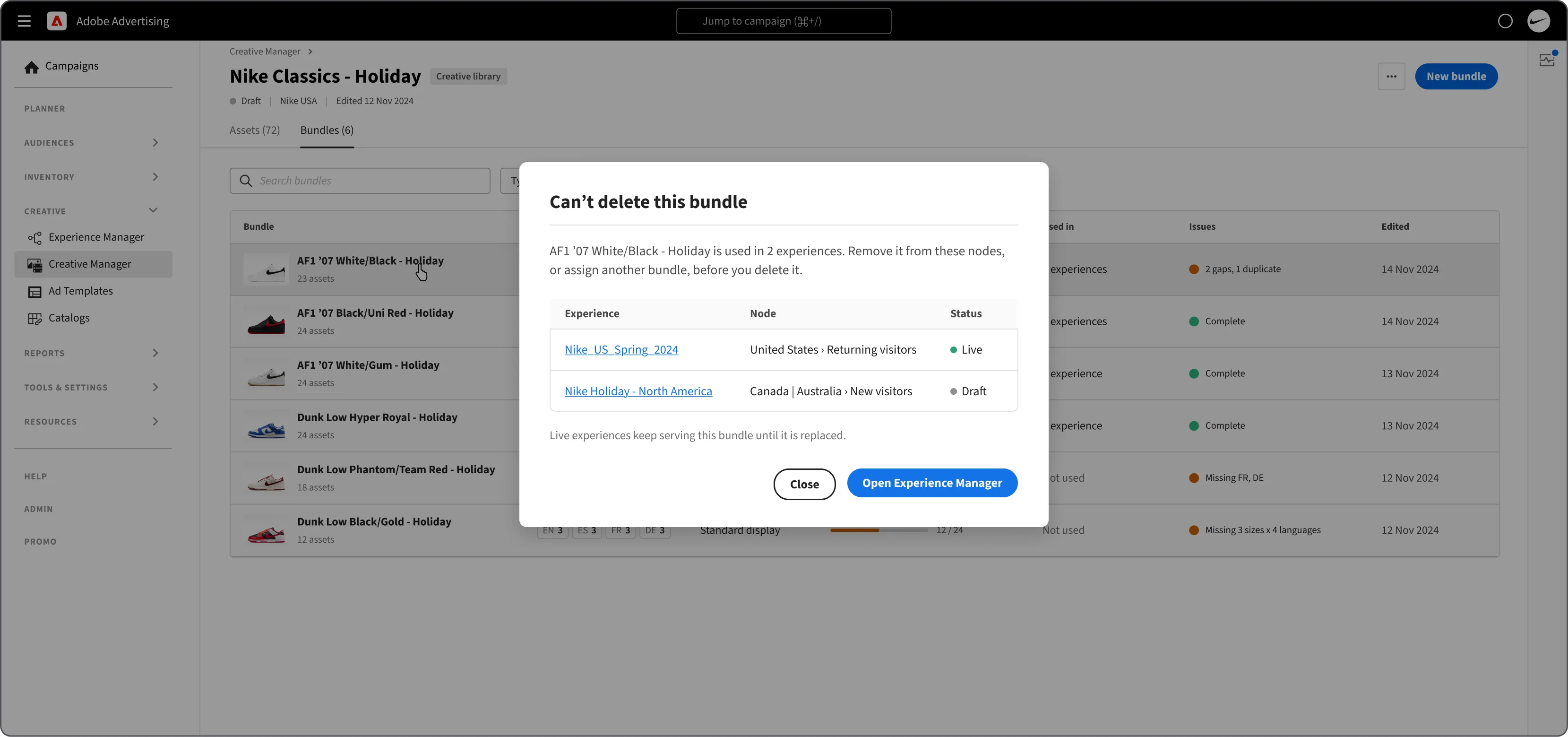
Creative Manager holds an advertiser’s Creative Libraries. A creative library groups assets: static ads (images, static HTML, and hard-coded files) and dynamic ads (an HTML template mapped to a catalog). Bundles group assets across sizes and languages.
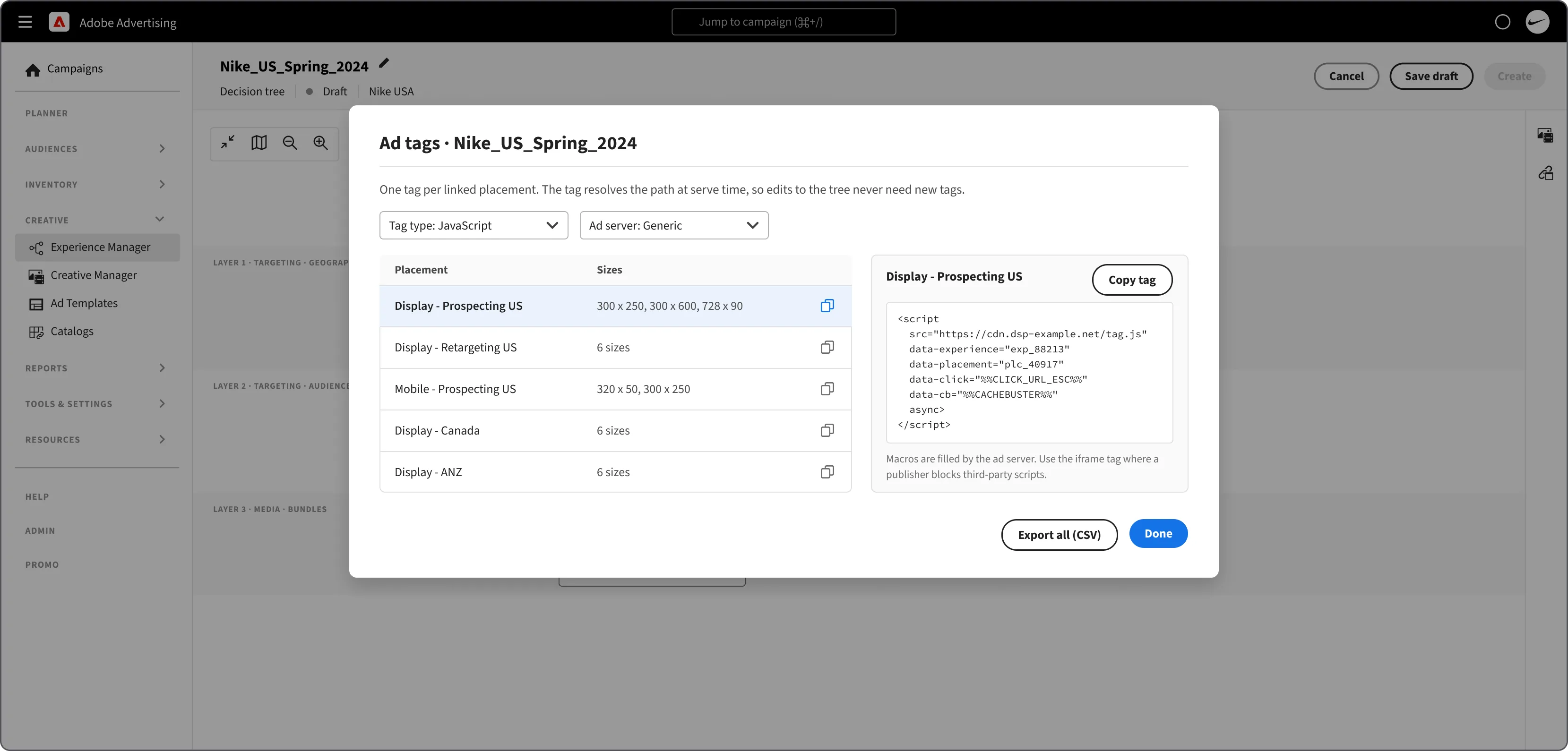
Ad Templates hold HTML5 ads with placeholders, and Catalogs hold the feed files that fill them. Experience Manager builds the targeting logic: each decision funnel serves a bundle or an asset, through one ad tag per placement, resolved at serve time.
The new branch
Where Creative 2.0 sits in the DSP
The hard parts
Challenges
From the IA to porting the DCO workflows into the existing DSP, at every altitude.
- Where Creative lives 10,000 ftA side nav item, or a menu in the header beside DSP? In the side nav: a submenu, an accordion, or always open?
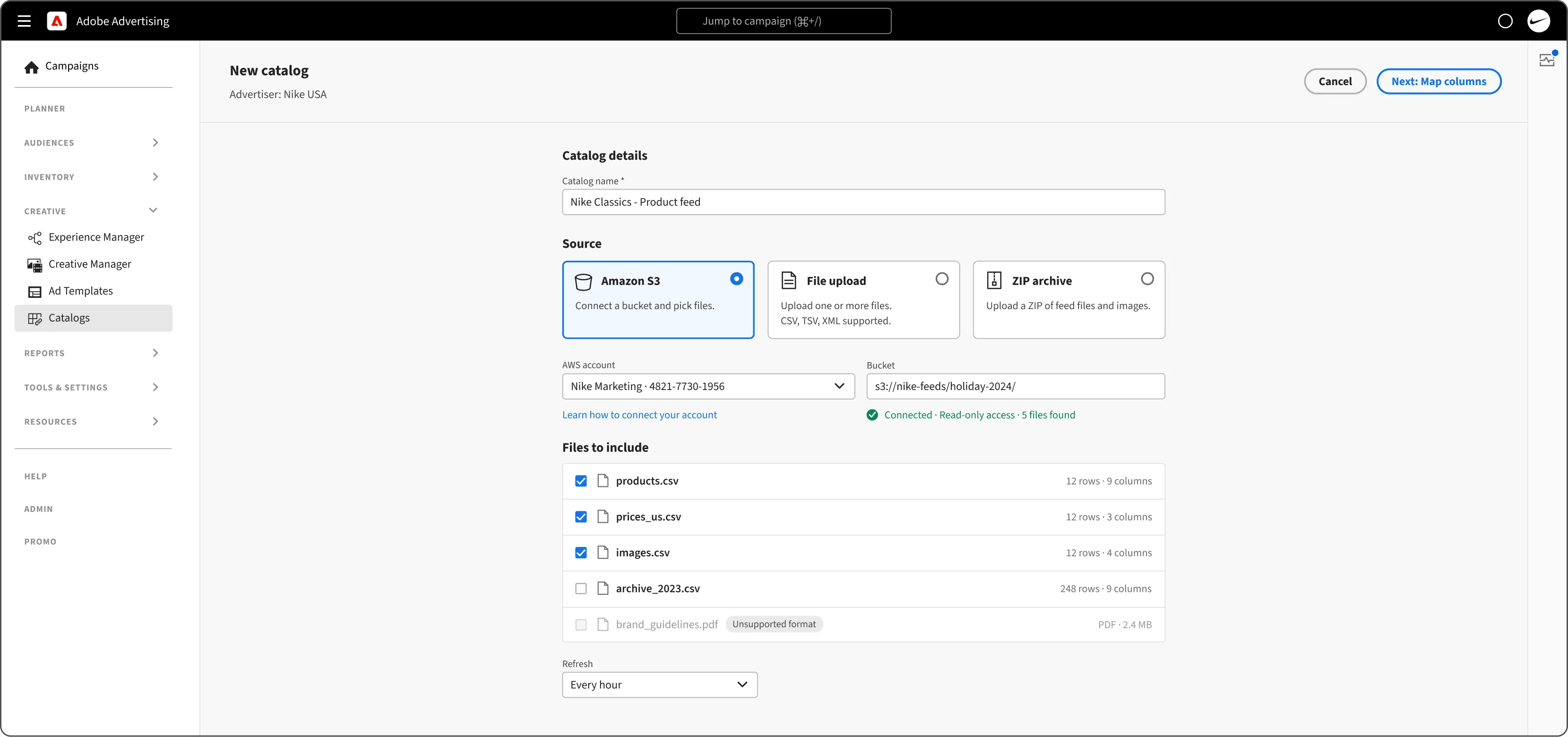
- Processing catalogs and templates 1,000 ftA catalog turns feed files into product rows. An ad template is the HTML boilerplate ad with slots for that data.
- Creating and managing assets 100 ftStatic ads, and dynamic ads that pour catalog data into a template’s slots, grouped into bundles.
- Building experiences 10 ftTargeting layers that form a funnel, directing each viewer to the right ad.
- Closing the loopReading how each branch, region, device, and creative performs, and reporting it back to the client.
Challenge 01 | Ingress
Where Creative lives
A side nav item, or a menu in the header beside DSP? In the side nav: a submenu, an accordion, or always open?
Making the house a home for Creative 2.0
What would be the ideal entry point for a persona working on any of the creative or targeting tools?
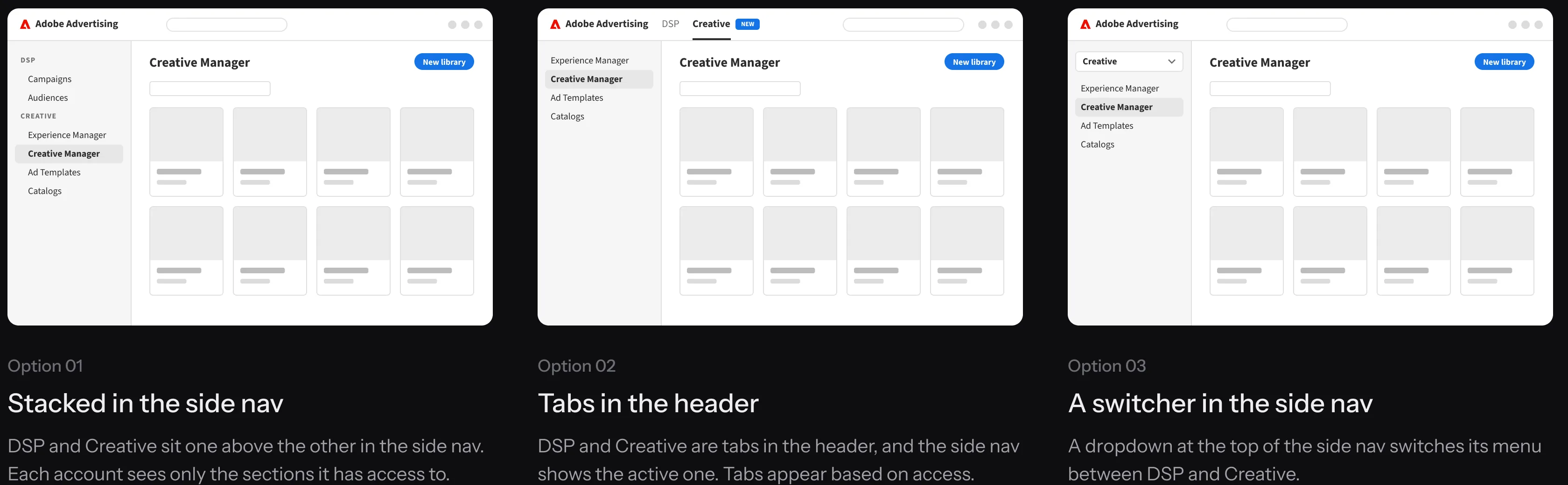
Why Creative lives in the side nav
Option 01: Creative tooling as a subsection of the primary menu.
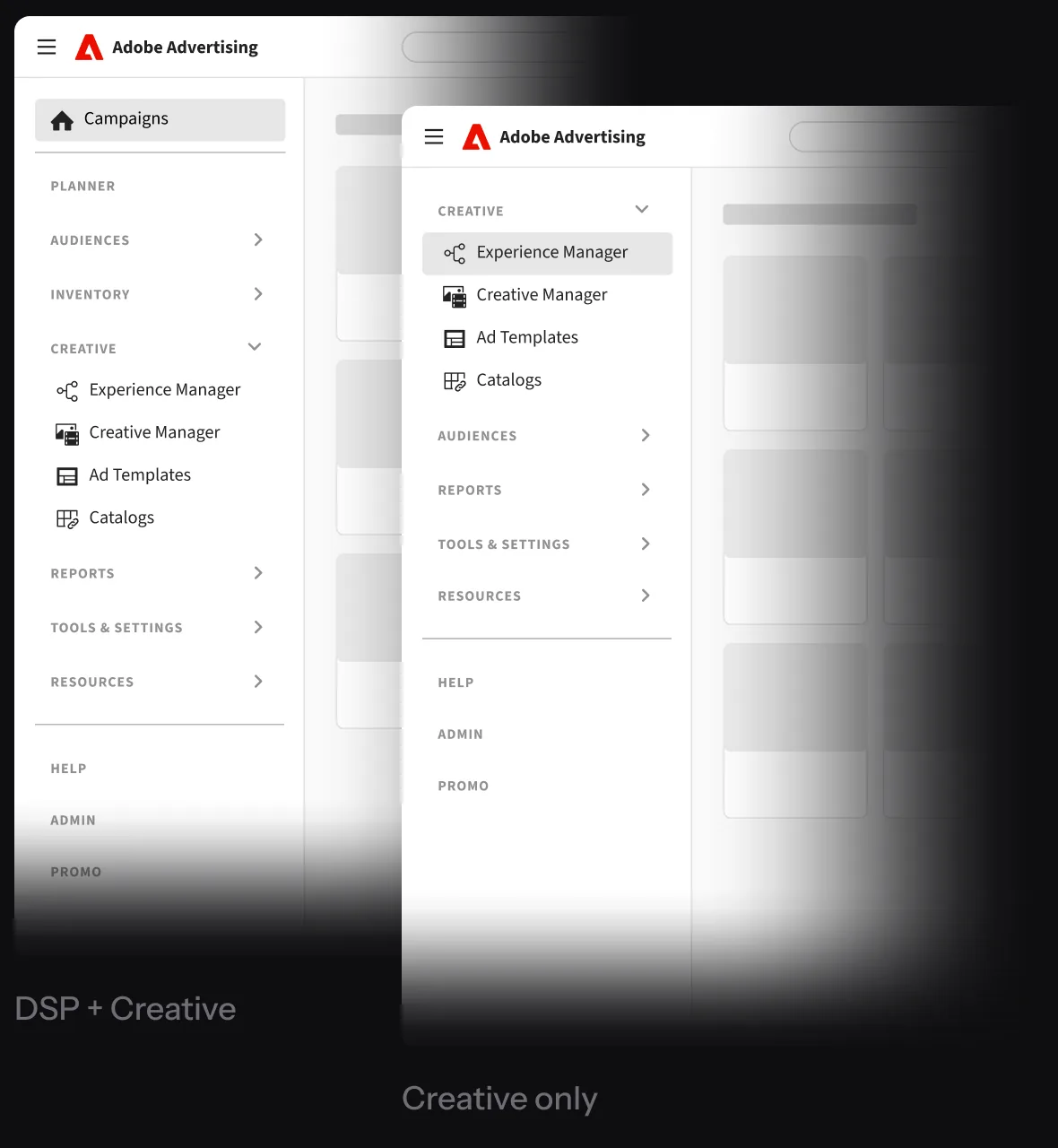
- Creative is part of the DSPHeader tabs would have made Creative look like a separate product, and a dropdown would have hidden it. Here it is always visible, whether the account has the DSP, Creative, or both.
- One nav for campaign managersCampaign managers move between campaigns and creative all day. One nav, with Reports and Tools & Settings shared, lets them do both without switching tools.
- Error alerts open in the same navWhen an alert flags a broken asset or experience, clicking it opens the fix without changing the layout.
- Reuses a familiar menu patternAudiences, Inventory, and Reports already expand like this. Creative works the same way, so there is nothing new to learn.
Challenge 02 | Catalogs and templates
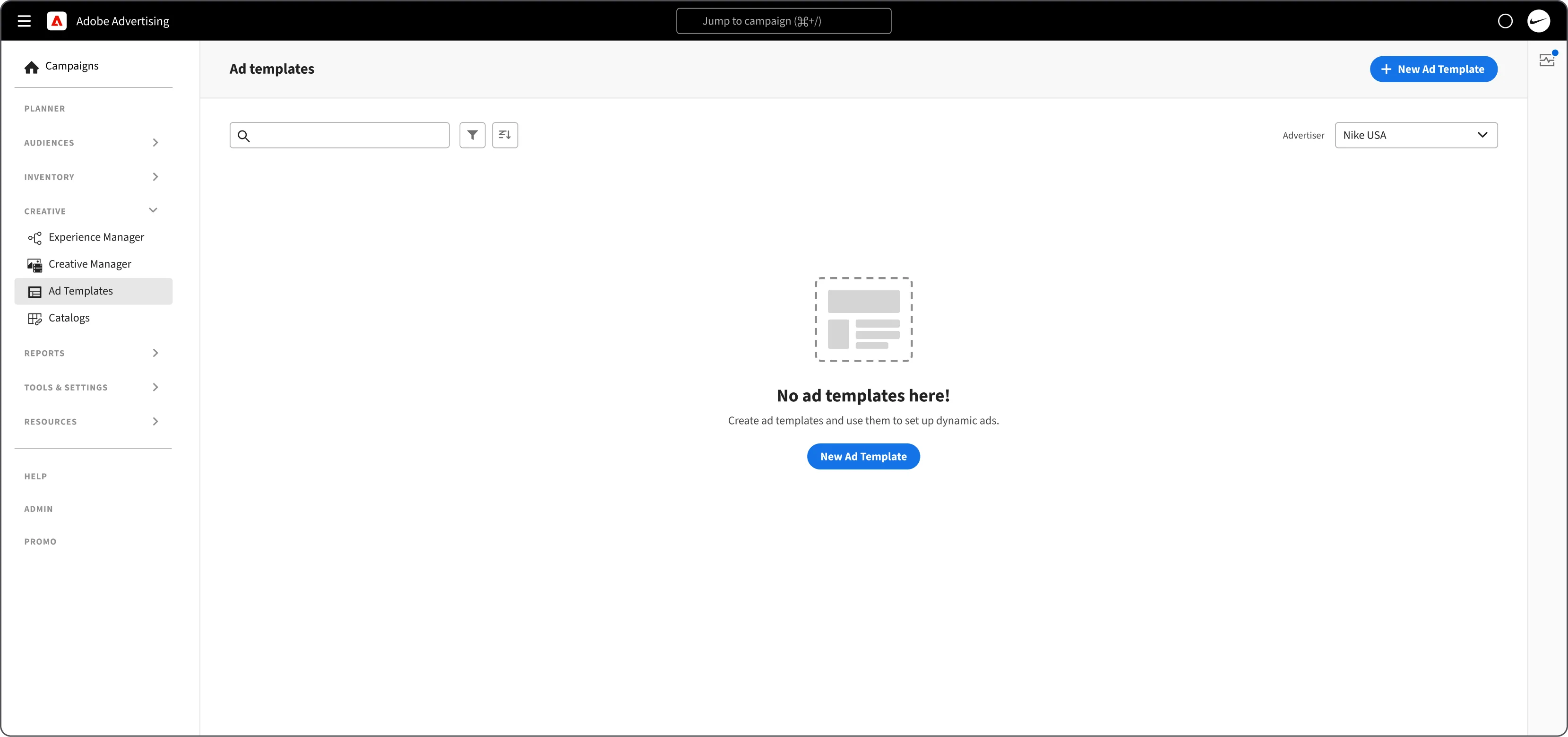
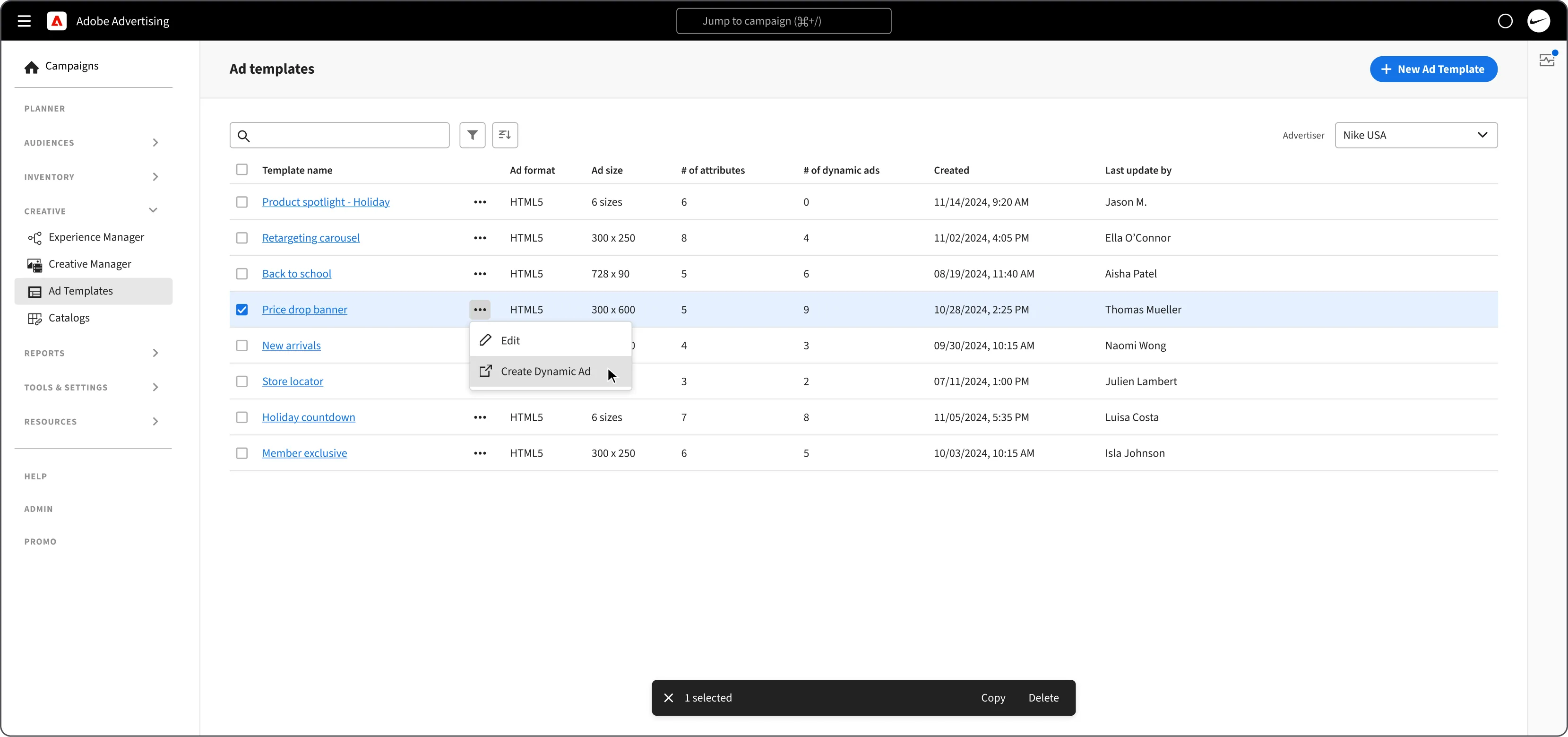
Processing catalogs and templates
A catalog turns feed files into product rows. An ad template is the HTML boilerplate ad with slots for that data.
Challenge 03 | Assets
Creating and managing assets
Static ads, and dynamic ads that pour catalog data into a template’s slots, grouped into bundles.
Challenge 04 | Experiences
Building experiences
Targeting layers that form a funnel, directing each viewer to the right ad.
Six ways to build decision logic
Experience Manager needed a simple way to decide which bundle each viewer sees.
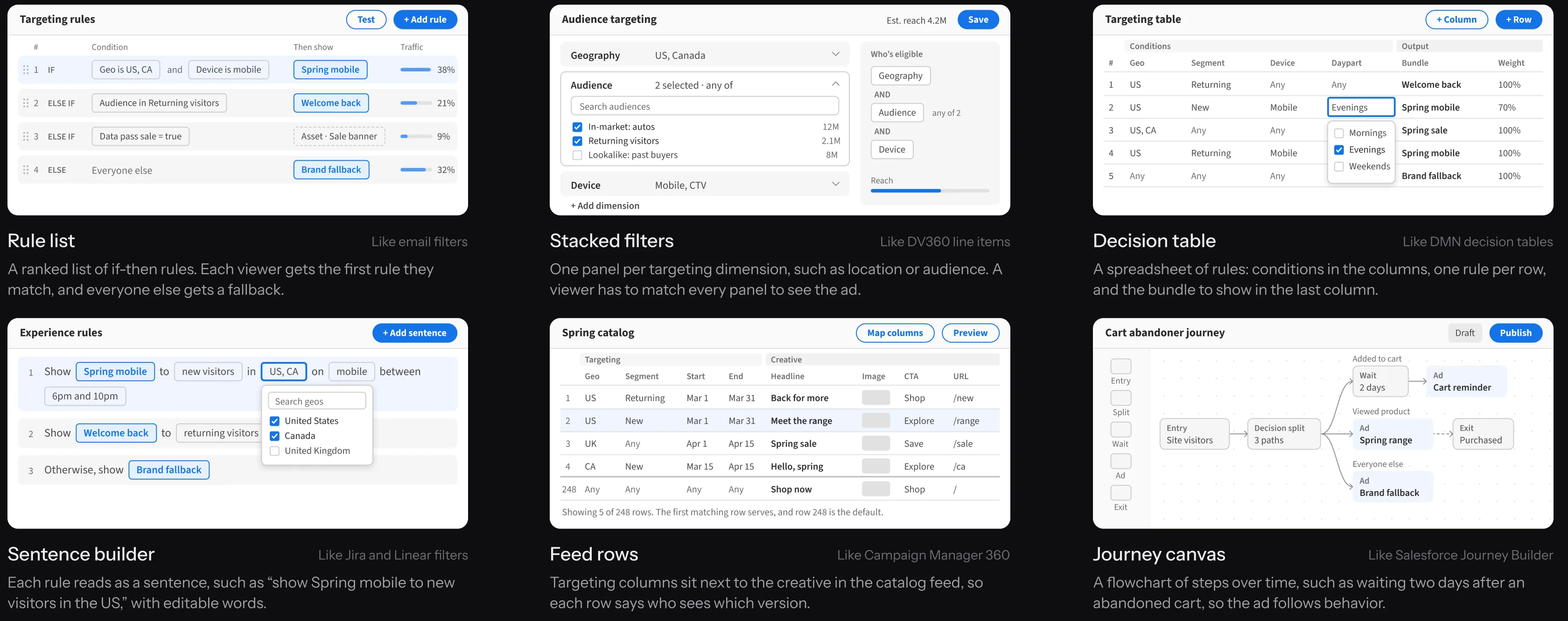
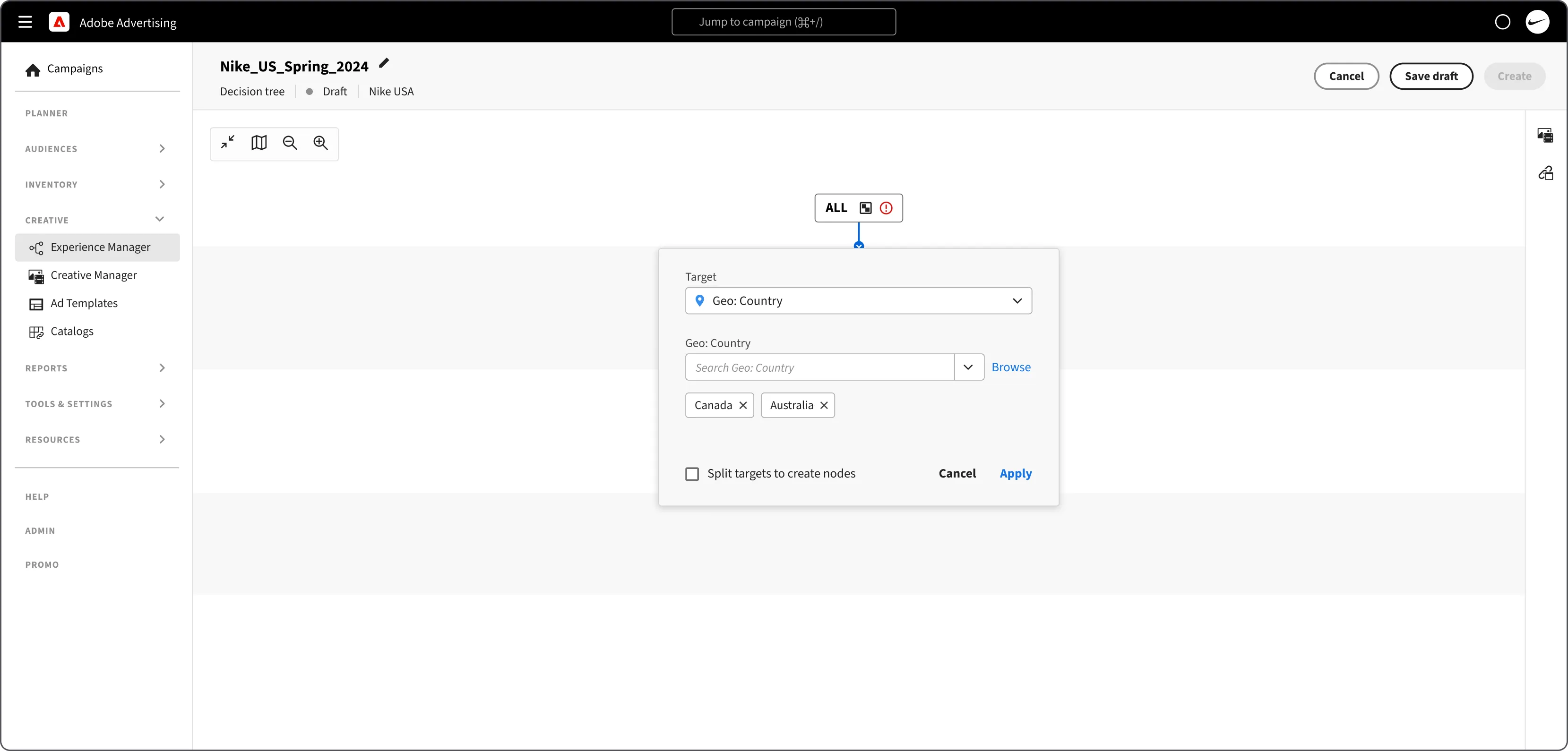
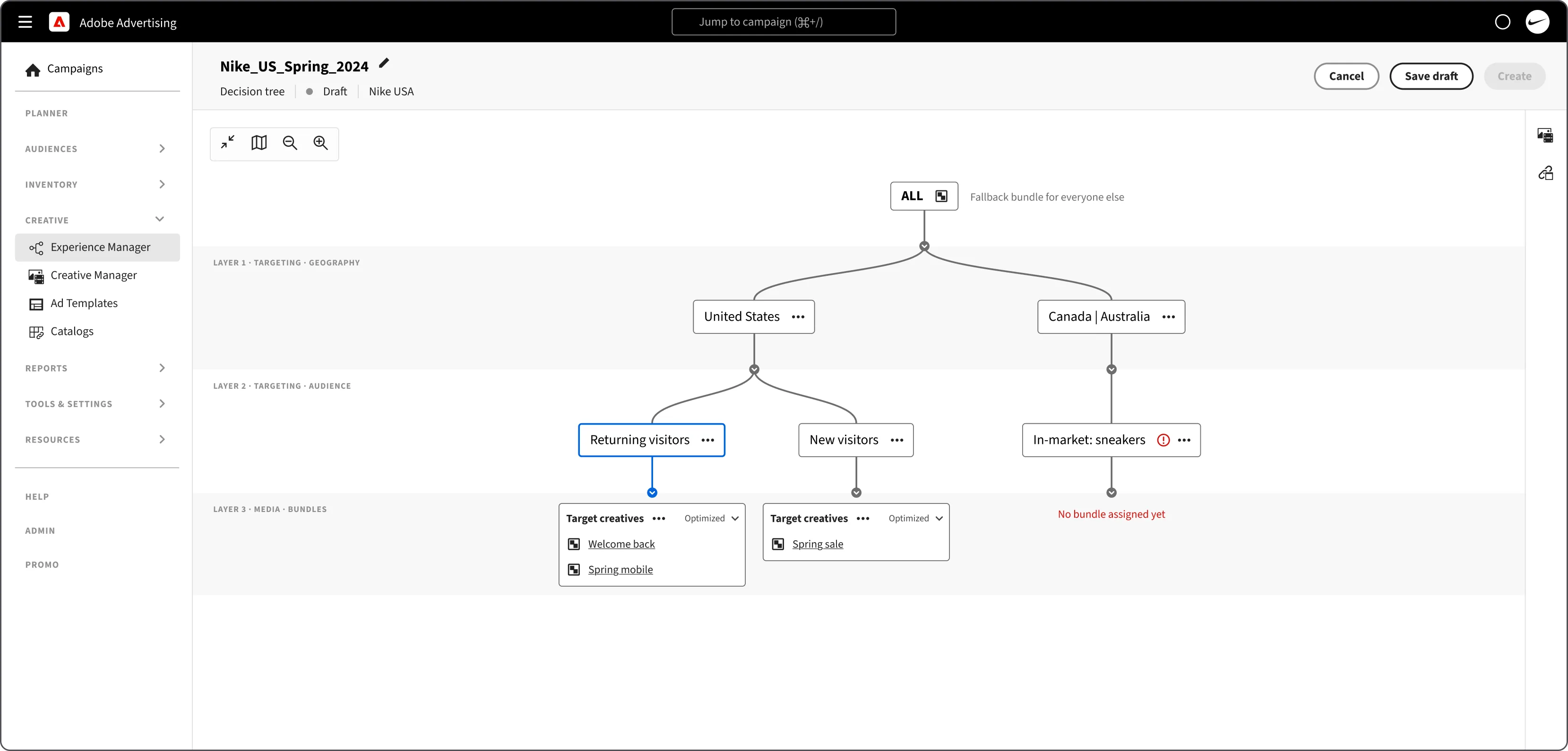
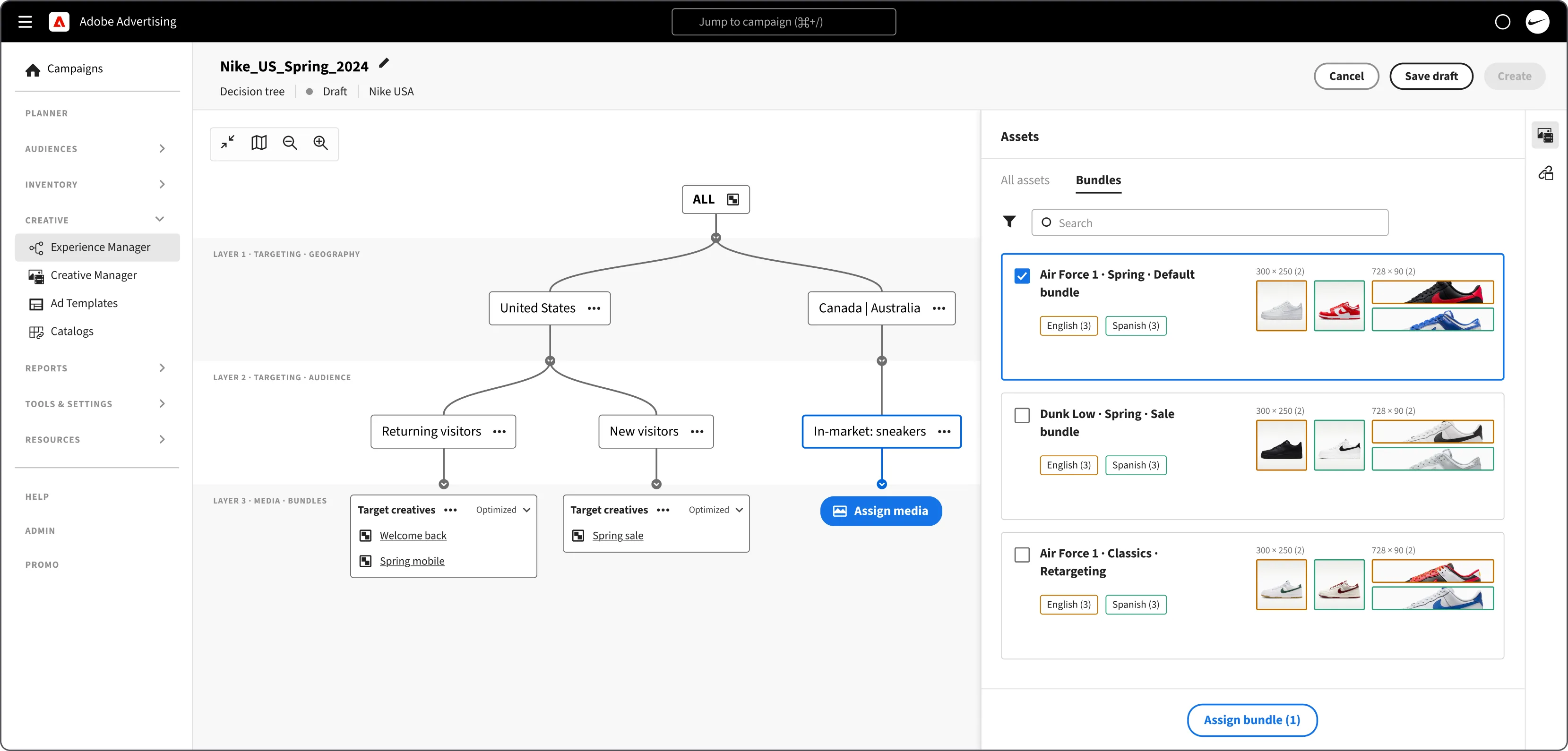
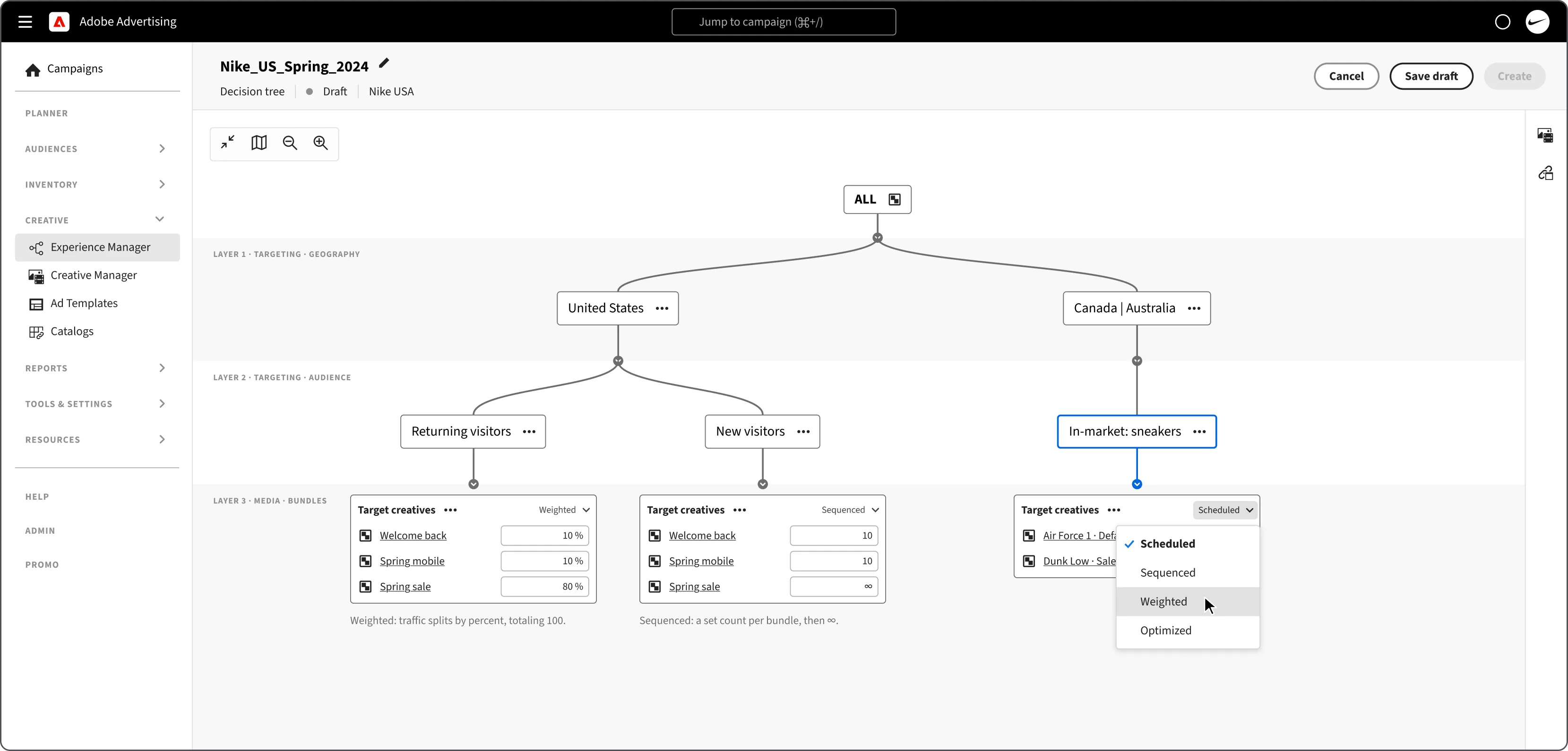
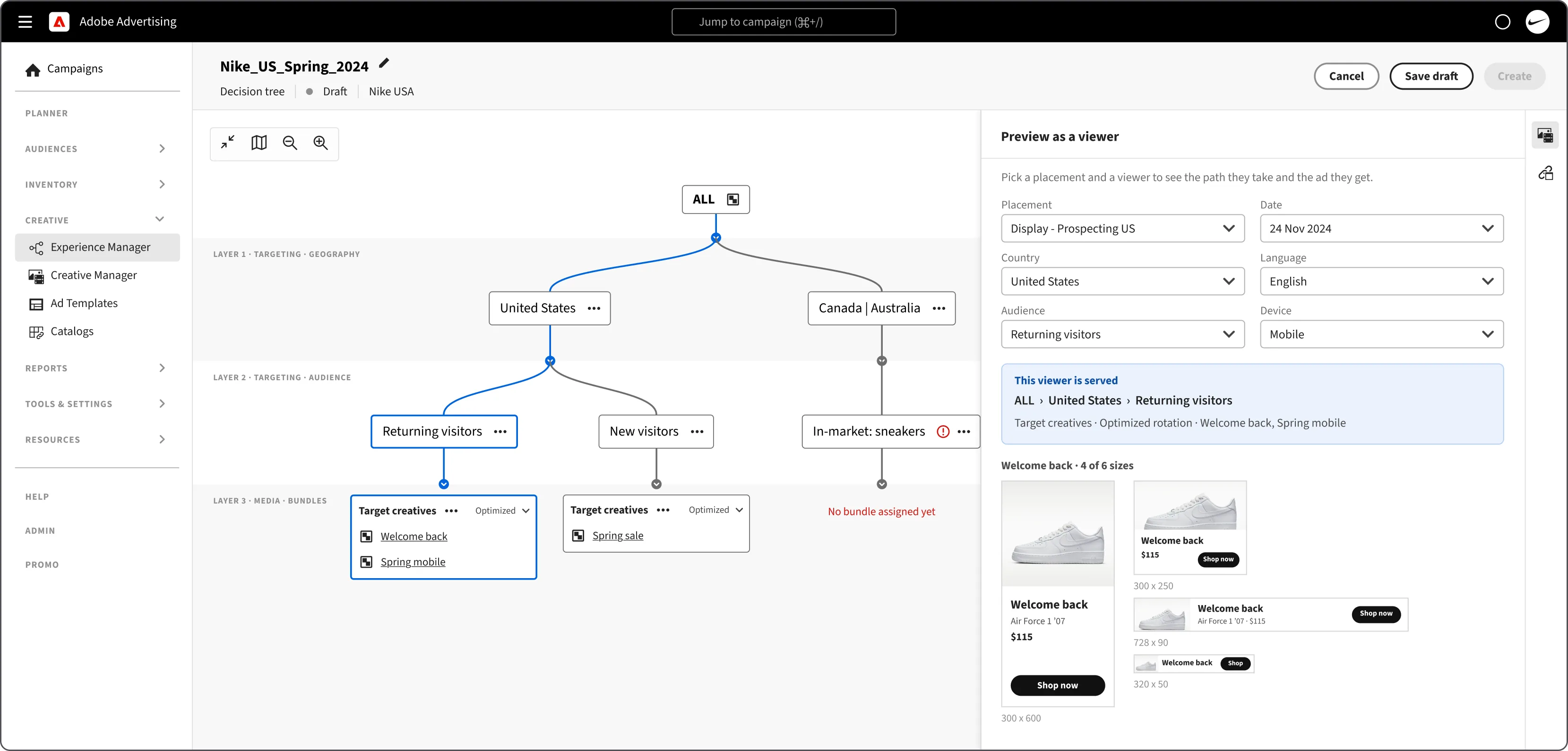
The decisioning funnel - Experience Manager
A top-down decision tree. Each horizontal layer either targets viewers or attaches media.
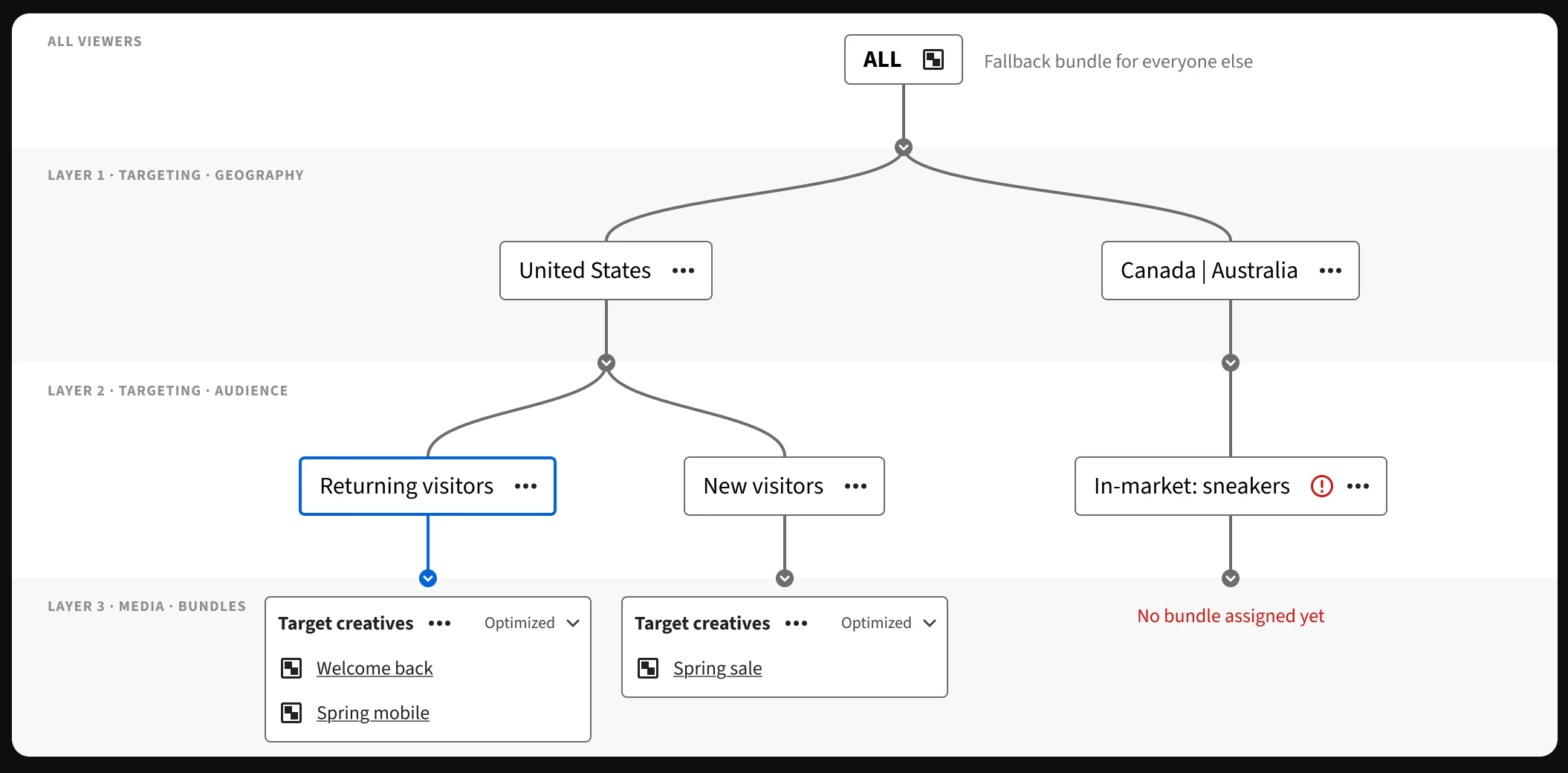
- Each layer targets or attaches mediaEvery new layer is either a targeting layer, such as geography or audience, or a media layer that attaches bundles.
- Every path reads top to bottomA node can hold several values, such as Canada or Australia. A viewer needs to match one value in every layer of a path.
- Bundles sit at the end of each pathEach end node gets one or more bundles, with rotation and scheduling. The ALL node holds the fallback bundle.
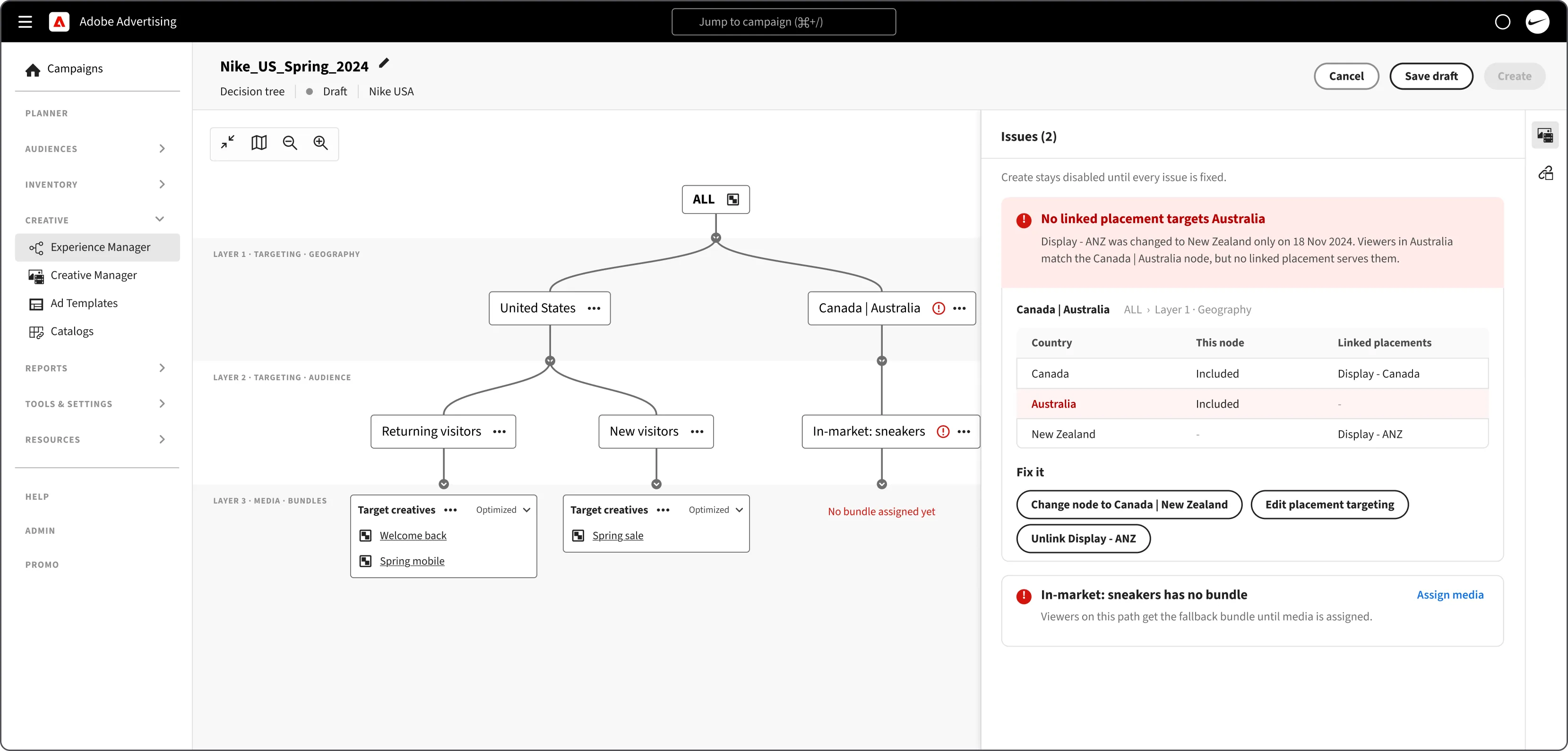
- Problems show on the nodeA red mark flags a path that is missing a bundle or a size, right where it needs fixing.
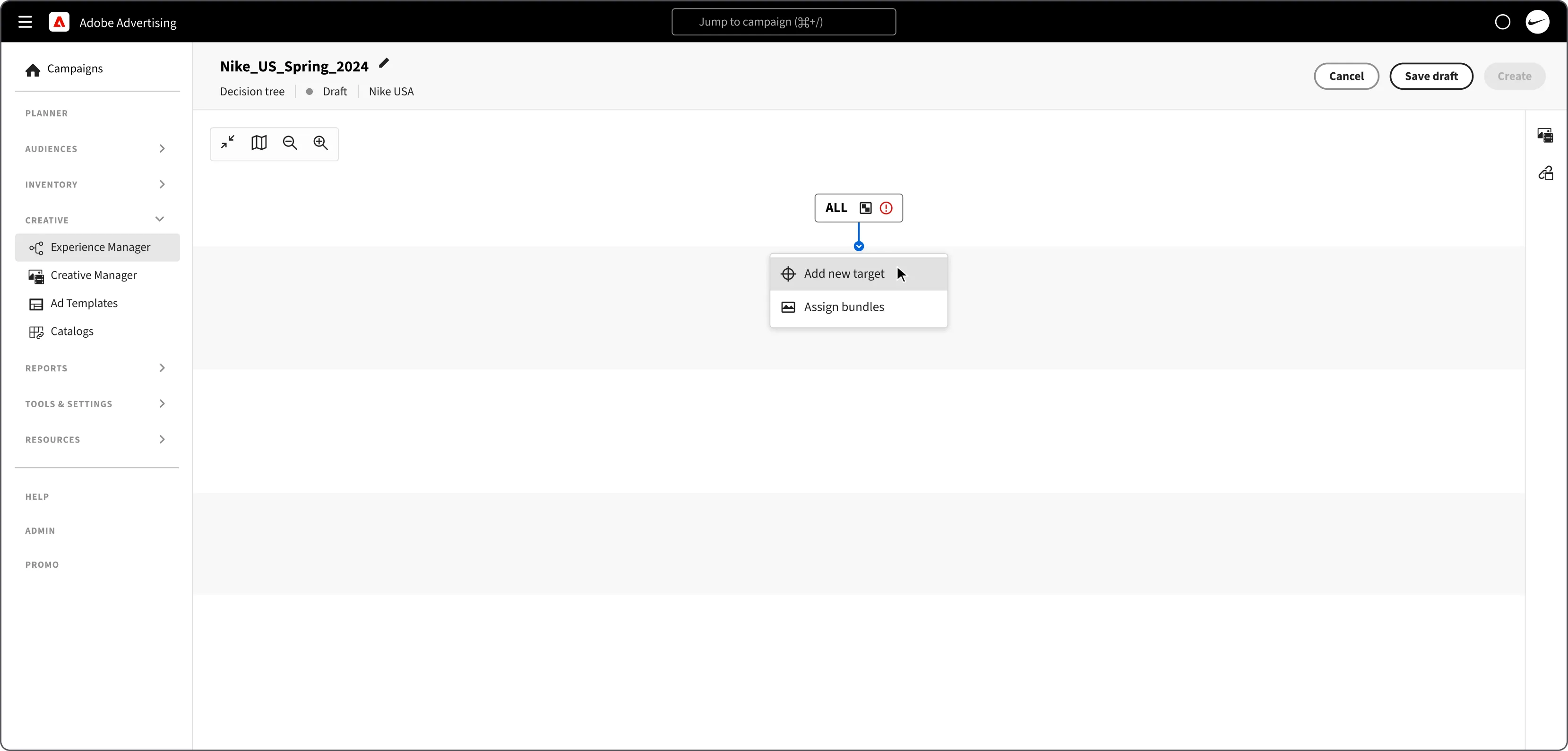
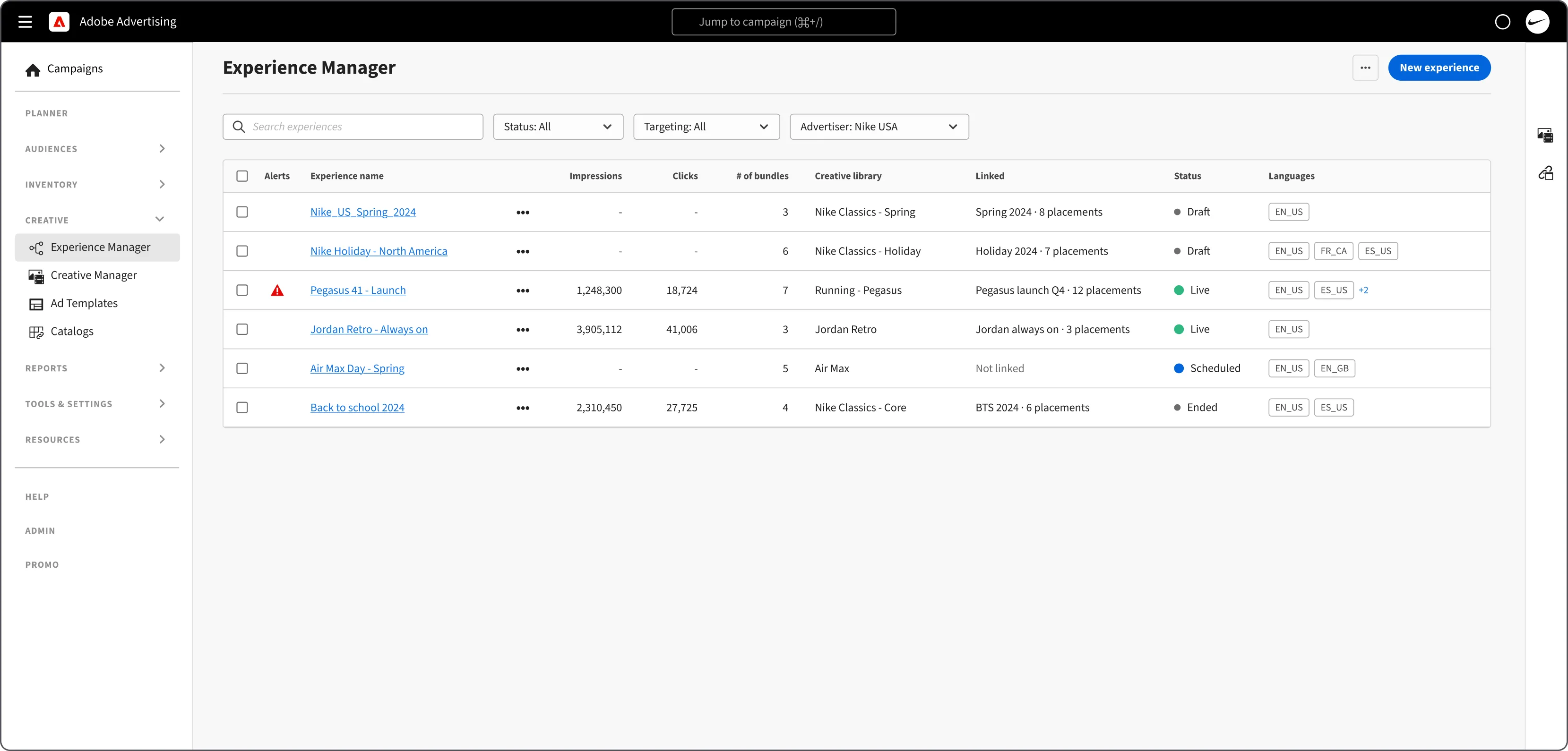
Review every experience in one list
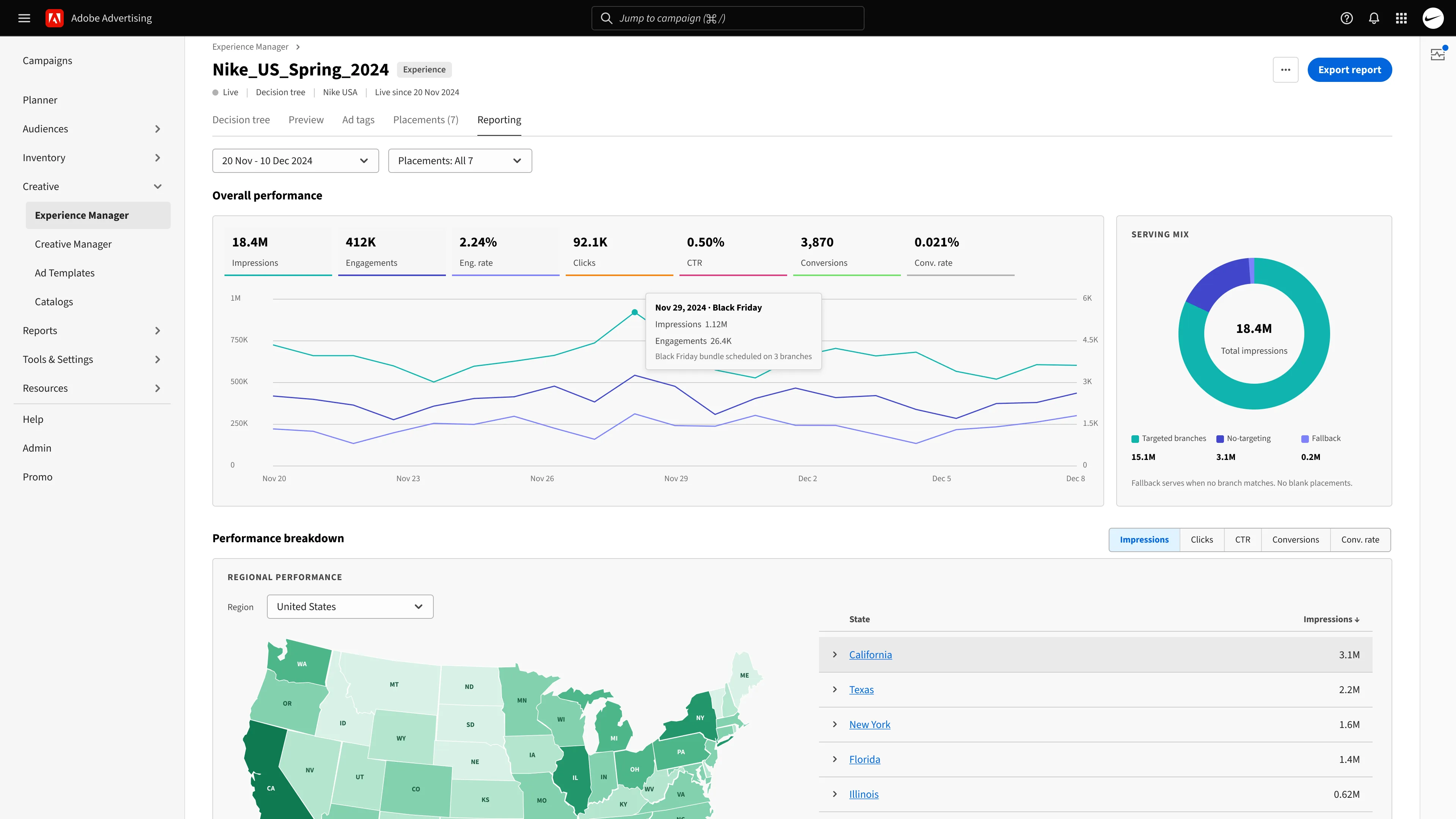
Challenge 05 | Reporting
Closing the loop
Understanding performance and enabling reporting.
Outcome
Creative 2.0 stood the test of time
ACS took over, and clients went self-serve
The DCO-specific team was absorbed into ACS, which now runs dynamic creative for managed clients. Adobe onboarded multiple accounts to use Creative 2.0 on a self-serve basis.
Creative libraries grew into Creative Studio
The architecture was expanded to ingest assets from Adobe Creative Cloud, and creative libraries extended into brand management toolkits.
The alerts framework held up
It still anchors how issues are surfaced, and now uses AI models to troubleshoot and optimize experience builds and delivery.
Google dropped its plan to deprecate cookies in Chrome in July 2024, but a self-serve product with less dependence on cookies set Adobe Advertising up for success. Safari and Firefox already sideline third-party cookies with their privacy rules. (Adobe Advertising Creative documentation)
Measuring success
| Lens | Metric | Why it matters | Direction |
|---|---|---|---|
| North star | Ad spend served through dynamic creative without a DCO handoff | Captures self-serve adoption and business value in one number | ↑ about 3× |
| Speed | Time to launch a dynamic campaign, media brief to first serve | The TAT that the DCO handoff and QA cycles used to stretch | ↓ about 60% |
| Speed | Handoffs per campaign (DCO and ACS tickets) | Each handoff is a delay and a chance for error | ↓ about 70% |
| Quality | Share of setup errors caught before launch | Errors moved from delivery reports to build time | ↑ most caught at build |
| Quality | Time to diagnose a delivery issue | Issues on the node make a failing setup traceable | ↓ about 50% |
| Adoption | Share of dynamic campaigns built self-serve | Whether clients run it without Adobe’s help | ↑ a rising share |
| Adoption | Bundles reused across more than one experience | Creative libraries working as the source of assets | ↑ reused across experiences |
| Reporting | Optimization actions taken from path and bundle reports | Insight turning into weight changes and bundle swaps | ↑ about 2× |
| Business | Dynamic ad spend per advertiser | Personalization at scale growing account value | ↑ about 25% |
| Business | ACS hours per managed-service advertiser | Margin on the managed service | ↓ about 35% |
| Guardrail | Fallback share of impressions and serve error rate | Self-serve can’t come at the cost of delivery | Held steady |
Notional: relative values only. Absolute numbers are confidential.
Looking back
Reflections
A shared vocabulary is table stakes
In a revamp this large, everyone has to use the same taxonomy and words. Building that baseline, and getting stakeholders to buy into it, kept every conversation on the same page.
New ideas, introduced in steps
Translating new concepts into patterns people already knew, step by step, meant nobody had to adopt a whole new paradigm at once.